Topics
Introduction to ICT
Creating Textual Communication
- Purpose of Creating Textual Documents
- Word Processor Basics
- Keyboard Functions
- Creating and Formatting a Document
- Saving and Opening Documents
- Text Formatting
- Error Detection Tools
- Cut, Copy and Paste
- Bullets and Numbering
- Tables in LibreOffice
- Inserting Images in LibreOffice
- Headers and Footers
- Print Preview and Printing
- Protecting Documents
Creating Visual Communication
Creating Audio-Video Communication
Presenting Ideas
Getting Connected: Internet
Safety and Security in the Cyber World
Fun with Logic
Flipping and Rotating Images
Steps for Flipping the image :
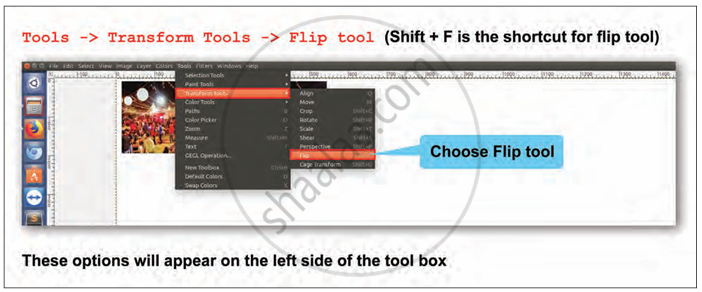
Step 1: Click on the Menu Path Tools → Transform Tools → Flip Tool
Step 2: It shows the exact navigation within the GIMP menu system to access the Flip Tool.
Step 3: The shortcut for accessing the Flip Tool directly is Shift + F. It allows quicker access without navigating through menus.
For example: Flipped Image 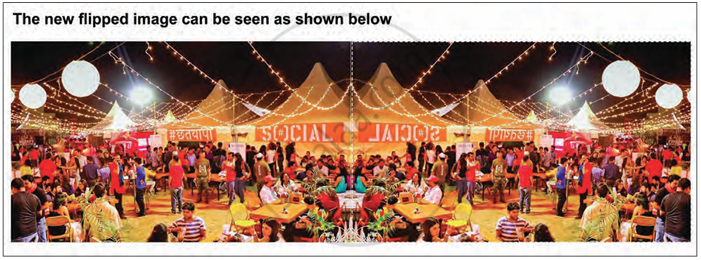
Steps for rotating an image :

Step 1: The window shown is titled "Rotate," and it appears once selected
Step 2: Enter the angle (in degrees) for rotation of the image For example : 90°, 80°, 100°.
Step 3: These fields define the pivot point or center around which the image rotates. Center X = 409.50 and Center Y = 230.00 mean the rotation will happen around that point in the image.
Step 4: Then Click on Rotate Option it will rotate the image
