Topics
Introduction to ICT
Creating Textual Communication
- Purpose of Creating Textual Documents
- Word Processor Basics
- Keyboard Functions
- Creating and Formatting a Document
- Saving and Opening Documents
- Text Formatting
- Error Detection Tools
- Cut, Copy and Paste
- Bullets and Numbering
- Tables in LibreOffice
- Inserting Images in LibreOffice
- Headers and Footers
- Print Preview and Printing
- Protecting Documents
Creating Visual Communication
Creating Audio-Video Communication
Presenting Ideas
Getting Connected: Internet
Safety and Security in the Cyber World
Fun with Logic
Adding Costumes and Sounds Effects in Animations
1) Adding Costumes
Step 1: Select the sprite for which you want to add a costume.
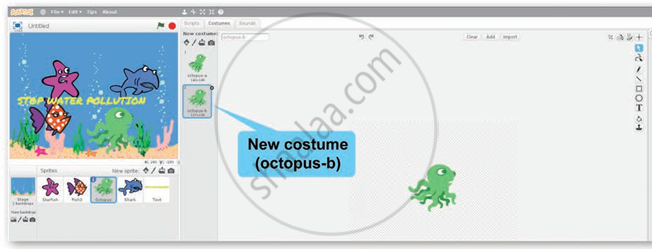
Step 2: Click the Costume tab. The selected sprite (octopus-a) is displayed on the tab.

Step 3: To Choose a New Costume Click the Choose Costume from Library button to open the Costume Library.

Step 4: Navigate to the Underwater theme and select Octopus - b as the new costume.
Step 5: Click OK. The new costume (octopus - b) will be added to the sprite's costume list for use in animation or story transitions.
2) Sounds Effects in Animations
Step 1: Select the desired sprite. for e.g., starfish.
Step 2: Click the Sounds tab → Choose Sound from Library.

Step 3: The Sound Library opens browse and select sounds.

Step 4: Added sounds (e.g., water drops, coughing male, ripple for starfish) appear in the Sounds tab for the selected sprite.

