Topics
Introduction to ICT
Creating Textual Communication
- Purpose of Creating Textual Documents
- Word Processor Basics
- Keyboard Functions
- Creating and Formatting a Document
- Saving and Opening Documents
- Text Formatting
- Error Detection Tools
- Cut, Copy and Paste
- Bullets and Numbering
- Tables in LibreOffice
- Inserting Images in LibreOffice
- Headers and Footers
- Print Preview and Printing
- Protecting Documents
Creating Visual Communication
Creating Audio-Video Communication
Presenting Ideas
Getting Connected: Internet
Safety and Security in the Cyber World
Fun with Logic
Creating Animated Stories Using Scratch
1. Scratch allows you to go beyond static images and create animated stories using characters (sprites) and sound effects. You can visually express imaginary concepts or creative ideas, such as fairy tales or fantasy adventures.
2. Instructions must be given in a logical order to create a meaningful animation or story. This helps in communicating ideas effectively, just like how tools for text, images, audio, or video are used.
3. Traditional tools like text editors or image editors cannot bring fictional characters to life through movement and interaction. Scratch is ideal for imaginary stories like talking animals, space travel, or magical worlds.
4. Example : A story where the underwater animals are talking about water pollution.
a. Characters (Sprites):
- Twinkle : a starfish
- Octi : an octopus
- Blue : a whale
- Laali : a fish
b. Setting: Underwater background to represent the ocean.
c. Elements Used:
- Text (for dialogues or messages).
- Sounds such as coughing and water ripples to enhance realism.
Adding Sprites in Scratch for a Story :
Step 1: When you open Scratch, the Cat Sprite appears by default in the center of the stage.
Step 2: Click Choose Sprite from Library button. .
.

Step 3: From the Sprite Library choose any category theme or type of sprite.
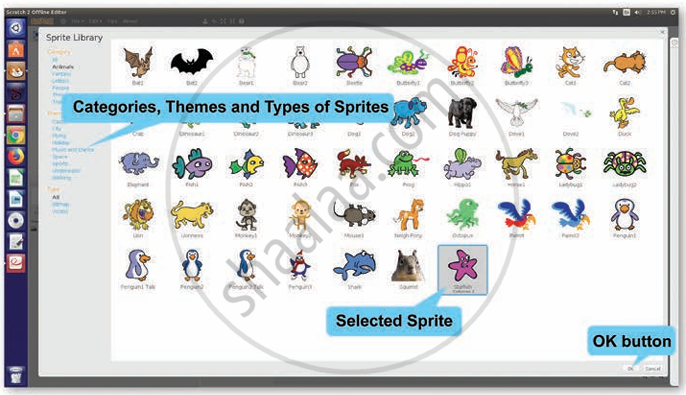
Step 4: Choose the desired sprite and click the OK button. The sprite will be added to your project. It will be displayed on the stage as well as in the sprite area.
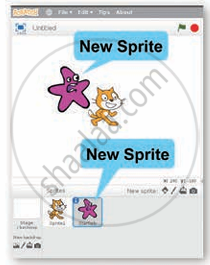
Step 5: Follow the steps and add all the four sprites to your project.
