Topics
Introduction to ICT
Creating Textual Communication
- Purpose of Creating Textual Documents
- Word Processor Basics
- Keyboard Functions
- Creating and Formatting a Document
- Saving and Opening Documents
- Text Formatting
- Error Detection Tools
- Cut, Copy and Paste
- Bullets and Numbering
- Tables in LibreOffice
- Inserting Images in LibreOffice
- Headers and Footers
- Print Preview and Printing
- Protecting Documents
Creating Visual Communication
Creating Audio-Video Communication
Presenting Ideas
Getting Connected: Internet
Safety and Security in the Cyber World
Fun with Logic
CBSE: Class 9
Safety in the Cyber World
1) Importance of Safe Habits from Childhood
- Since childhood, our parents and elders have guided us to practice good habits like eating healthy, maintaining hygiene, effective communication, and avoiding interaction with strangers.
- These habits aim to help us grow into confident, strong, and positive individuals capable of handling the challenges of the real world.
2) Digital Presence in the Cyber World
- With increased online activity, everyone creates a digital footprint
- A digital footprint refers to all the information about a person available on the Internet, based on their online behavior, such as Posts shared, Searches made, Emails sent, Comments or uploads.
- The Internet has created a global cyber world where people access and share information and connect and interact with others. Like in the real world, it is crucial to be alert, responsible, and cautious in this digital environment to stay safe.
3) Understanding Spam Emails
- Email is a primary tool for sending and receiving information and messages. While email is useful, it also comes with risks, especially from unknown senders.
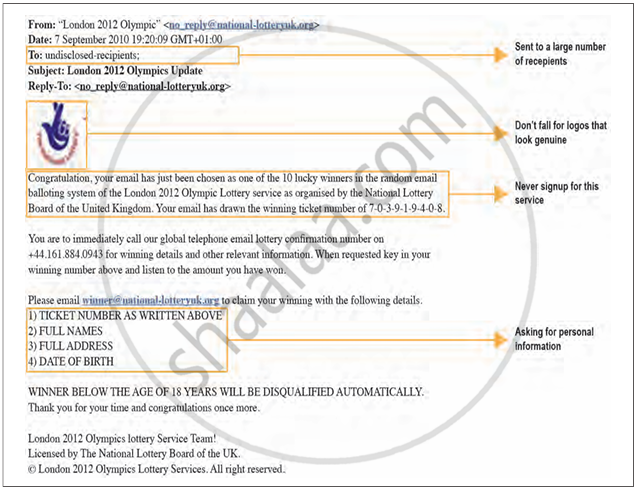
- Spam mails are unwanted or suspicious emails often received from unknown or unverified sources. They may Claim you are a lucky winner, Ask for personal or sensitive information or Tempt you with offers, prizes, or links.
- These emails are sent with malicious intent and can lead to Scams, Phishing attacks and Data theft or system infection.
- Users must avoid opening suspicious links or attachments and never share personal information in response to such emails.