Topics
Introduction to ICT
Creating Textual Communication
- Purpose of Creating Textual Documents
- Word Processor Basics
- Keyboard Functions
- Creating and Formatting a Document
- Saving and Opening Documents
- Text Formatting
- Error Detection Tools
- Cut, Copy and Paste
- Bullets and Numbering
- Tables in LibreOffice
- Inserting Images in LibreOffice
- Headers and Footers
- Print Preview and Printing
- Protecting Documents
Creating Visual Communication
Creating Audio-Video Communication
Presenting Ideas
Getting Connected: Internet
Safety and Security in the Cyber World
Fun with Logic
CBSE: Class 9
Email Features and File Safety
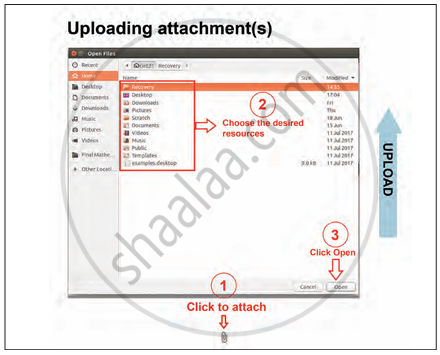
1) Uploading a Document
- The process of attaching a document to an email is also known as uploading.
- It allows the sender to share files like documents, images, or audio with others.
- This is useful when sharing event-related content or resources with friends, teachers, or colleagues.
2) Reading Emails in the Inbox
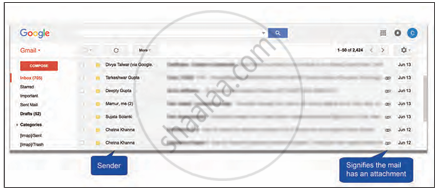
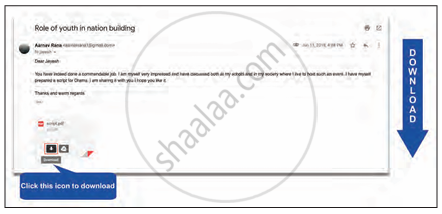
The Inbox is a digital folder in an email account where all received emails are stored To view the content of an email, simply click on the email in the inbox. Emails may include messages and attachments, which can be opened or downloaded.
3) Caution Before Downloading Attachments
Be careful before downloading any attachment from an email, as it may contain malware or viruses.
Checklist for Downloading Attachments
- Is the email from a trusted source?
- Is the attachment in a recognised file format?
- Have you performed an antivirus scan on the file?
Only if the answers to all the above questions are positive, proceed with download.
4) Computer Viruses and Antivirus Software
- A computer virus is a harmful software program that can Damage or delete files and affect the performance of the system and spread to other devices.
- Antivirus software helps to detect, quarantine, and remove viruses. Examples include: Norton, Kaspersky, McAfee, etc.
5) Responsible Behavior in the Cyber World
- The various security concerns in this Internet-based world known as the cyber world The Internet (cyber world) brings many benefits, but it also includes security risks.
- Many cyber threats occur due to the misuse of technology. Since not all users behave ideally online, it becomes our duty to act responsibly.
- Practice the same level of care, respect, and responsibility online as we do in the real world. Set a positive example for others by following safe, respectful, and ethical digital practices.
