Topics
Introduction to ICT
Creating Textual Communication
- Purpose of Creating Textual Documents
- Word Processor Basics
- Keyboard Functions
- Creating and Formatting a Document
- Saving and Opening Documents
- Text Formatting
- Error Detection Tools
- Cut, Copy and Paste
- Bullets and Numbering
- Tables in LibreOffice
- Inserting Images in LibreOffice
- Headers and Footers
- Print Preview and Printing
- Protecting Documents
Creating Visual Communication
Creating Audio-Video Communication
Presenting Ideas
Getting Connected: Internet
Safety and Security in the Cyber World
Fun with Logic
CBSE: Class 9
Bookmarking and Evaluating Web Resources
1) Bookmarking Webpages
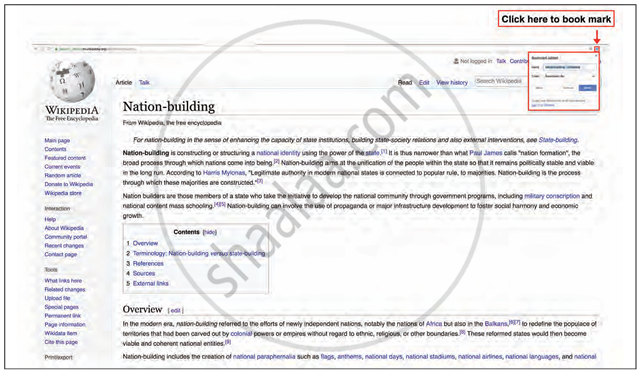
- Bookmarking refers to the process of saving the URL of a webpage so that it can be accessed quickly in the future without needing to search for it again.
- While exploring web resources, some pages may be useful for later reference. Instead of taking a printout (which wastes paper), bookmarking is an eco-friendly way to save them digitally.
- In most web browsers, you can click on the bookmark icon (a star symbol) located in the address bar to save the page for future use.
2) Importance of Evaluating Online Resources
All information available on the Internet is not necessarily accurate, reliable, or of good quality. Since anyone can publish content online, users must take responsibility to verify its authenticity before using it Just because something is published online does not mean it is credible. So, evaluation is crucial before using any resource for academic or event purposes.
3) Evaluation Criteria for Web Resources
- Find out who created the website and whether there is any way to contact the owner. Legitimate sites usually provide this information.
- Understand why the website exists. Is it designed for commercial gain, for sharing educational content, or for some other reason?
- Identify whether the site is meant for teachers, students, or both. This helps in judging the tone and depth of the content.
- The content should be verified by cross-checking with other trusted sources like books, reliable websites, or subject experts.
- Check whether the site offers free access to the information or if it demands payment or a subscription.
4) ICT Tools
- Identify suitable ICT (information and communication technology) tools to customise and present the gathered resources.
- These tools can be used to design, edit, format, or combine the collected media (text, images, etc.) into meaningful content for your event.