Topics
Introduction to ICT
Creating Textual Communication
- Purpose of Creating Textual Documents
- Word Processor Basics
- Keyboard Functions
- Creating and Formatting a Document
- Saving and Opening Documents
- Text Formatting
- Error Detection Tools
- Cut, Copy and Paste
- Bullets and Numbering
- Tables in LibreOffice
- Inserting Images in LibreOffice
- Headers and Footers
- Print Preview and Printing
- Protecting Documents
Creating Visual Communication
Creating Audio-Video Communication
Presenting Ideas
Getting Connected: Internet
Safety and Security in the Cyber World
Fun with Logic
CBSE: Class 9
Using Keyword
1) Use specific keywords for each item in your event programme to search for resources Keywords help you collect relevant materials, media, or information for planning.
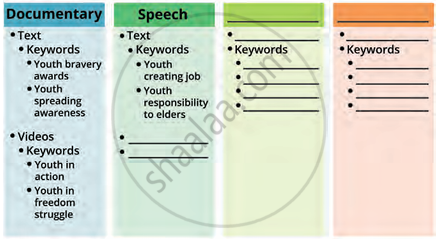
2) Fill a graphic organiser with:
- Given programme items and their related keywords.
- Your own chosen items and appropriate keywords for each.
3) Learn to use simple keywords to gather general resources. This improves comfort with using search engines for event planning.
4) Advanced Search with Operators
| Operator | Example | Purpose |
|---|---|---|
| AND | youth AND nation | The result shown will include pages having all the keywords. |
| OR | youth OR nation | The result shown will include pages having at least one of the keywords. |
| " " | "Role of youth in the development of nation" | The result shown will include pages having the entire phrase. |
| … | "Role of Youth," 1990…2018 | The result shown will include pages having the specified number range. |
These operators help in narrowing or refining your search. They make it easier to find specific information suited to your needs
