Topics
Querying and SQL Functions
- Introduction of Database Query Using SQL
- Functions in SQL
- GROUP BY Clause in SQL
- Operations on Relations
- Using Two Relations in Query
Data Handling using Pandas - I
- Introduction to Python Libraries
- A Series
- DataFrame
- Importing and Exporting Data between CSV Files and DataFrames
- Pandas Series Vs NumPy ndarray
Data Handling using Pandas - II
- Introduction of Data Handling Using Pandas – II
- Descriptive Statistics
- Data Aggregations
- Sorting in Data Structure
- GROUP BY Functions
- Altering the Index
- Other DataFrame Operations
- Handling Missing Values
- Import and Export of Data between Pandas and MySQL
Plotting Data using Matplotlib
- Introduction of Plotting Data Using Matplotlib
- Plotting Using Matplotlib
- Customisation of Plots
- The Pandas Plot Function (Pandas Visualisation)
Internet and Web
- Concept of Computer Network
- Network Devices
- Networking Topologies
- Internet, Web and the Internet of Things
- Applications of Internet
- Key Concepts of Web Technology
- Website Hosting
- Browsers
Societal Impacts
- Introduction of Societal Impacts
- Digital Footprints
- Digital Society and Netizen
- Data Protection
- Software Licensing
- Creative Commons
- Cyber Crimes
- IT Act of India 2000
- E-waste: Hazards and Management
- Impact on Health
Project Based Learning
- Introduction of Project Based Learning
- Approaches for Solving Projects
- Teamwork
- Project Description
- World Wide Web (WWW)
- Web Page
- Website
- Web Browser
- Web Client
- Web Server
- Web Address/URL
CBSE: Class 9
Web Browsers
A web browser is a software application that allows users to access and interact with content on the World Wide Web (WWW). It acts as an interface between the user and the Internet, enabling the retrieval, rendering, and navigation of web pages and other resources such as videos, images, and files. For Example : Google Chrome, Safari, Mozilla Firefox, Opera, Microsoft Edge.
Mozilla Firefox
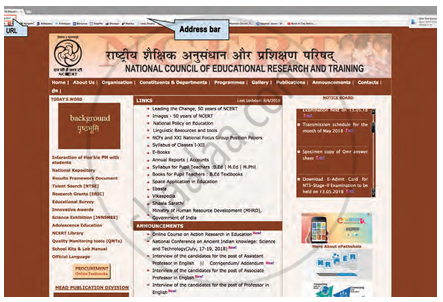
Layout of the Mozilla Firefox browser
- Webpage : A webpage is a single document on the Internet. It can contain text, images, audio, video, and other multimedia elements Each webpage has a unique URL (Uniform Resource Locator).
- Website : A website is a collection of related webpages. It is accessed through a common domain name Contains multiple pages like Home, About Us, Contact, etc.
- Home Page : The first page you see when a website opens Acts as the main navigation point for the entire website.
- Address Bar : Found at the top of a web browser, Used to type the URL of a webpage/resource After typing the URL and pressing Enter, the browser loads the webpage.
- URL (Uniform Resource Locator): It is the address of a webpage on the Internet Allows users to locate and access resources on the web.
- Hyperlink : A clickable element (text/image) that connects one webpage to another. The mouse cursor changes to a hand symbol when hovered over a hyperlink Helps in navigating between pages or resources.
