Topics
Introduction to Microprocessors and Organization of 8085
Instruction Set and Programming of 8085
- Introduction to Set and Programming of 8085
- Instruction Cycle
- Addressing Modes
- Programming model of 8085
- Introduction to Classification of 8085
- How to Write and Execute Simple Assembly Language Program ?
- Data Transfer Instruction
- Arithmetic Group Instructions
- Logical Group Instructions
- Branching Group Instructions
- Machine Control Instruction
Introdcution to Intel X-86 Family
Introduction to Microcontroller
Networking Technology
- Modem
- Ethernet Card
- RJ45
- Repeater and Hub
- Switch
- Router
- Gateway
Introduction to connectivity devices
Modem
Computers store digital data, but telephone lines transmit analog data. Modems convert digital signals to analog for transmission and back to digital for reception—this process is called modulation and demodulation. Modems enable internet access and tasks like email and data transfer, but they have limited bandwidth. Modem speeds are measured in bits per second and are classified as asynchronous or synchronous. Asynchronous modems transmit data without a clock using start bits for timing and are ideal for PC-to-PC communication. Synchronous modems use clocks and synch signals, allowing for the transmission of various data types with error checking via CRC.
Hubs
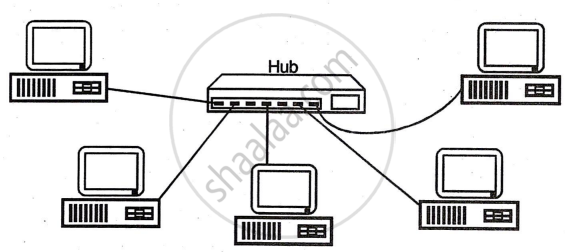
Hubs are central connection points for network cabling, with three types: passive, active, and switching. Passive hubs combine signals without processing them, while active hubs amplify and regenerate signals using electronic components. Switching hubs, the most advanced, quickly route signals between ports and can replace routers. Hubs are essential for extending networks, particularly those not using coaxial cables. Intelligent hubs add capabilities like network management and intelligent path selection in addition to signal amplification.
Repeaters
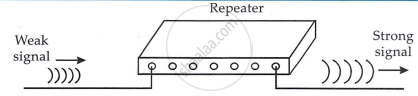
Repeaters are simple, inexpensive devices used to extend network cabling by regenerating signals. They do not filter or interpret data but simply repeat signals from one port to another. There are two types: amplifying repeaters, which boost the entire signal, and signal-regenerating repeaters, which create an exact duplicate of the original signal. By adding repeaters, the network length can be expanded beyond its predefined limit.
Routers
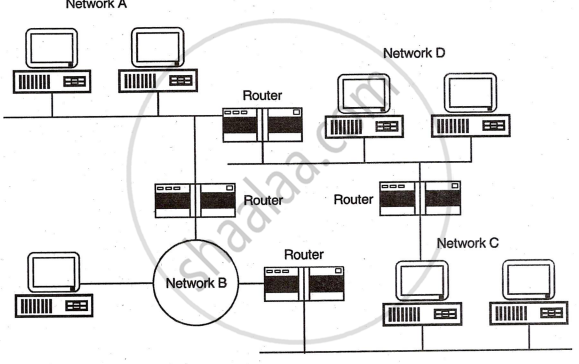
Routers are intelligent devices used for internetwork connectivity, connecting two or more independent networks, such as Ethernet and token-ring. They use logical network addresses to efficiently route data packets, employing algorithms to determine the best path for delivery. Routers can divide large LANs into smaller segments or connect LANs to WANs. They support protocols like IP, IPX, and DDP for routing. Routers can be static, requiring manual path specification, or dynamic, automatically determining routes. A router maintains a table of available routes and uses algorithms to select the most efficient one.
Modems
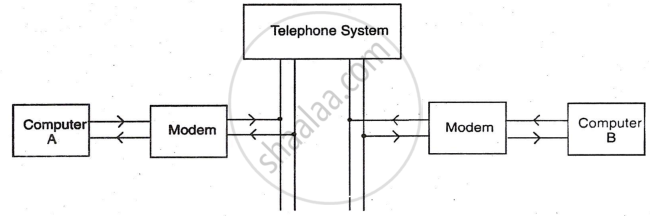
A modem is a device with both modulator and demodulator circuits. It converts binary signals into analog signals for transmission over telephone lines and then converts them back to binary at the receiver end, enabling digital communication via telephone lines.
Steps in digital communication using Modem
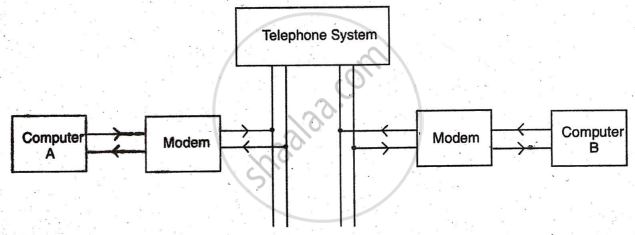
- The user at computer 'A' sends data in digital form.
- Computer 'A' converts the digital data into analog form using a modulation technique.
- The modulated signal, within telephone frequency range, is transmitted over the telephone line using the correct dial code.
- Computer 'B' is selected by its dial code.
- The modem of computer 'B' converts the analog modulated signal back into the original digital data through demodulation.
- The demodulated digital information is processed and displayed on the screen of terminal 'B'.
Shaalaa.com | Network Devices
Related QuestionsVIEW ALL [15]
Hi-Standard Tech Traj.ning Ltd. is a Mumbai based organization which is expanding its office set-up to Chennai. At Chennai office compound, they are planning to have 3 different blocks for Admin, Training and Accounts related activities. Each block has a number of computers, which are required to be connected in a network for communication, data and resource sharing.
As a network consultant, you have to suggest the best network related solutions for them for issues/problems raised by them in (i) to (iv), as per the distances between various blocks/locations and other given parameters.

Shortest differences between various blocks/locations:
| Admin Block to Accounts Block | 300 Metres |
| Accounts Block to Training Block | 150 Metres |
| Admin Block to Training Block | 200 Metres |
| MUMBAI Head Office to CHENNAI Office | 1300 Km |
The number of computers installed at various blocks is as follows:
| Training Block | 150 |
| Accounts Block | 30 |
| Admin Block | 40 |
1) Suggest the most appropriate block/location to house the SERVER in the CHENNAI office (out of the 3 blocks) to get the best and effective connectivity. Justify your answer.
2) Suggest the best-wired medium and draw the cable layout (Block to Block) to efficiently connect various blocks within the CHENNAI office compound.
3) Suggest a device/software and its placement that would provide data security for the entire network of the CHENNAI office.
4) Suggest a device and the protocol that shall be needed to provide wireless Internet access to all smartphone/laptop users in the CHENNAI office
Prime Computer Services Ltd. is an international educational organization. It is planning to set up its India campus in Mumbai with its head office in Delhi. The Mumbai office campus has four main buildings-ADMIN, ACCOUNTS, EXAMINATION, and RESULT.
You as a network expert have to suggest the best network-related solutions for the problems given below, keeping in mind the distances between the buildings and other given parameters.

Shortest distances between various buildings:
| ADMIN TO ACCOUNTS | 55 m |
| ADMIN TO EXAMINATION | 90 m |
| ADMIN TO RESULT | 50 m |
| ACCOUNTS TO EXAMINATION | 55 m |
| ACCOUNTS TO RESULT | 50 m |
| EXAMINATION TO RESULT | 45 m |
| DELHI Head Office to MUMBAI campus | 2150 m |
The number of computers installed at various buildings is as follows:
| ADMIN | 110 |
| ACCOUNTS | 75 |
| EXAMINATION | 40 |
| RESULT | 12 |
| DELHI HEAD OFFICE | 20 |
- Suggest the most appropriate location of the server inside the MUMBAI campus (out of the four buildings) to get the best connectivity for the maximum number of computers. Justify your answer.
- Suggest and draw cable layouts to efficiently connect various buildings within the MUMBAI campus for wired connectivity.
- Which networking device will you suggest to be procured by the company to interconnect all the computers of various buildings of the MUMBAI campus?
- The company is planning to get its website designed which will allow students to see their results after registering themselves on its server. Out of the static or dynamic, which type of website will you suggest?
- Which of the following will you suggest to establish online face-to-face communication between the people in the ADMIN office of the Mumbai campus and the Delhi head office?
a) Cable TV
b) Email
c) Video conferencing
d) Text chat
