Topics
Introduction to ICT
Creating Textual Communication
- Purpose of Creating Textual Documents
- Word Processor Basics
- Keyboard Functions
- Creating and Formatting a Document
- Saving and Opening Documents
- Text Formatting
- Error Detection Tools
- Cut, Copy and Paste
- Bullets and Numbering
- Tables in LibreOffice
- Inserting Images in LibreOffice
- Headers and Footers
- Print Preview and Printing
- Protecting Documents
Creating Visual Communication
Creating Audio-Video Communication
Presenting Ideas
Getting Connected: Internet
Safety and Security in the Cyber World
Fun with Logic
Scaling Images
Scaling is the process of resizing an image. Scaling down reduces the size of the image by decreasing the number of pixels. The canvas size is adjusted accordingly during scaling. Reduces image dimensions (width × height in pixels). Alters the resolution, which may affect image quality. Used to optimise images for different platforms (e.g., web, print).
An image can be scaled in two ways.
- Using Tools → Transform Tools.
- Using Image → Scale Image.
Scaling an image using the Tools menu :
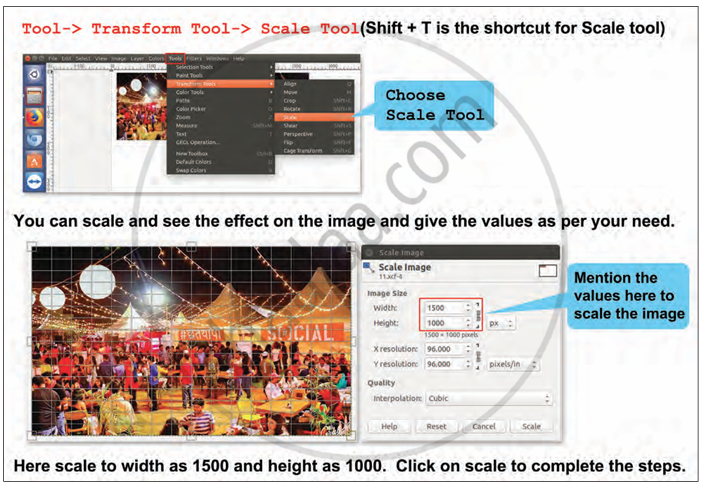
Step 1: Click on Tools → Transform Tools → Scale Tool. This path opens the scale tool for interactive resizing. Alternate there is a keyboard shortcut Shift + T
Step 2:
- Drag the corners or sides of the image to resize it manually.
- Preview the scaled image in real time before applying.
Step 3 : Scale Image dialog box
1. Image Size:
- Width : It represents the horizontal size of the image in pixels. For example : 1500 px
- Height : This represents the vertical size of the image in pixels. For example: 1000 px
2. Resolution of the image :
- X Resolution: Number of pixels per inch horizontally when printed.
- Y Resolution: Number of pixels per inch vertically when printed.
3. Quality → Interpolation : It determines how the software handles pixel data when scaling.
- None : no smoothing; fast but poor quality.
- Linear : smoother than none, good for quick edits.
- Cubic : best for maintaining image quality during scaling (chosen here).
- Sinc/Lanczos : best for high-quality reduction; slower but cleaner.
Step 4 : After entering values or adjusting manually Click the Scale button at the bottom-right to apply changes.
Scaling an image using the Image menu :

Step 1: Go to Image → Scale Image to resize the image.
Step 2: In the Scale Image window, enter the new width and height.
Step 3: Adjust resolution if needed (X and Y resolution).
Step 4: Choose interpolation quality (e.g., cubic).
Step 5: Click Scale to apply the changes.
