Topics
Introduction to ICT
Creating Textual Communication
- Purpose of Creating Textual Documents
- Word Processor Basics
- Keyboard Functions
- Creating and Formatting a Document
- Saving and Opening Documents
- Text Formatting
- Error Detection Tools
- Cut, Copy and Paste
- Bullets and Numbering
- Tables in LibreOffice
- Inserting Images in LibreOffice
- Headers and Footers
- Print Preview and Printing
- Protecting Documents
Creating Visual Communication
Creating Audio-Video Communication
Presenting Ideas
Getting Connected: Internet
Safety and Security in the Cyber World
Fun with Logic
CBSE: Class 9
Spam Emails and Their Risks
1) Purpose and Caution in Using Email
- Email is widely used to send and receive messages, documents, and information across the Internet.
- However, users must be cautious, as not all emails are safe.
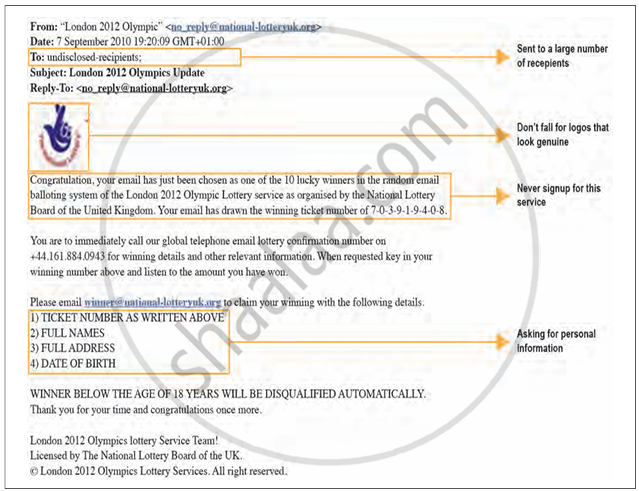
- Some emails may come from unknown or suspicious sources and try to mislead or trick users these types of emails are called spam emails.
2) Examples of Suspicious Emails
-
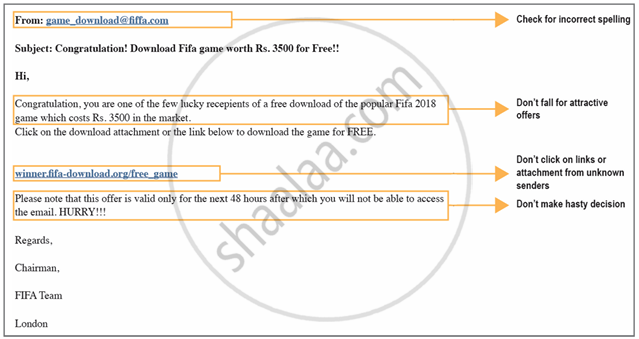
Example 1: An email claims to offer a popular game worth ₹3,500 for free and asks you to download it. Risk: The file may contain malware (malicious software) that can harm your device.
-
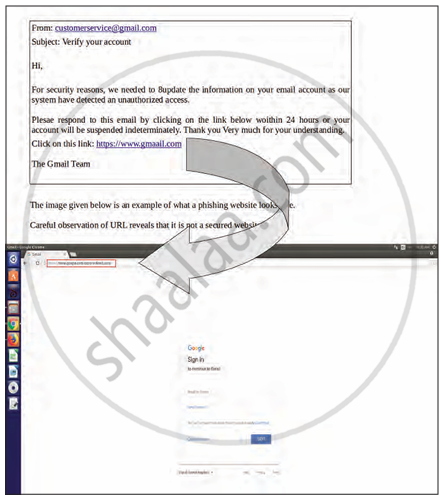
Example 2: An email contains a link asking you to verify your account details. Risk: Clicking the link might redirect you to a phishing website that steals your personal data.
3) Identifying Common Signs of Spam Emails
- The email is from an unknown sender.
- The subject line sounds too good to be true (free gifts, prizes).
- Contains urgent requests for personal details.
- Encourages you to click unknown links or download attachments.
- Poor grammar, spelling mistakes, or a suspicious-looking sender address.