Topics
Introduction to ICT
Creating Textual Communication
- Purpose of Creating Textual Documents
- Word Processor Basics
- Keyboard Functions
- Creating and Formatting a Document
- Saving and Opening Documents
- Text Formatting
- Error Detection Tools
- Cut, Copy and Paste
- Bullets and Numbering
- Tables in LibreOffice
- Inserting Images in LibreOffice
- Headers and Footers
- Print Preview and Printing
- Protecting Documents
Creating Visual Communication
Creating Audio-Video Communication
Presenting Ideas
Getting Connected: Internet
Safety and Security in the Cyber World
Fun with Logic
CBSE: Class 9
Keyboard Functions
A keyboard is an input device used to type and enter data or commands into a computer or other digital device. It consists of a set of keys (buttons) that allow the user to input letters, numbers, and symbols and perform specific functions.
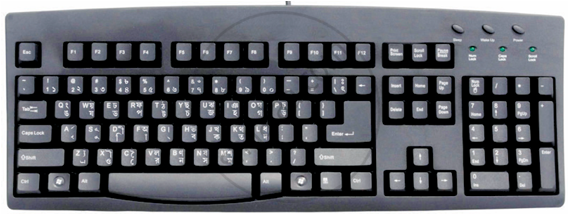
Functions of Keyboard :
- Shift : Used to type uppercase letters and special symbols when combined with other keys.
- Caps Lock : When activated, it types all letters in uppercase until turned off.
- Tab : Moves the cursor forward by a fixed space, often used for paragraph indentation.
- Ctrl (Control): Used in combination with other keys to perform shortcuts (e.g., Ctrl + C to copy).
- Alt (Alternate): Works with other keys for special commands, often in software menus.
- Esc (Escape): Cancels a task or closes dialog boxes and menus.
- Arrow Keys (↑ ↓ → ←): Move the cursor or scroll in the direction of the arrow.
- Home: Moves the cursor to the beginning of a line or document.
- End : Moves the cursor to the end of a line or document.
- PagUp : Scrolls the view up by one page in a document.
- Page Down : Scrolls the view down by one page in a document.
- Enter : Moves the cursor to a new line or submits commands.
- Backspace : Deletes the character to the left of the cursor.
- Delete : Removes the character to the right of the cursor.
- Spacebar : Inserts a space between words or characters.
- A–Z, 0–9 B Used for typing letters and numbers directly into documents or input fields.
- Num Lock : Turns the numeric keypad on/off.
- Fn : Key enables special functions on keys like brightness or volume.
- Windows: The key opens the Start Menu and triggers system shortcuts.
- AltGr : keys type special characters like €, @, or accented letters.
- Function keys :
Function Key Common Action F1 Open Help Menu F2 Rename Selected Item F3 Search Feature F4 Alt + F4 = Close Window F5 Refresh Page or Document F6 Jump Between Page Elements F7 Spell Check F8 Boot Menu / Extend Selection F9 Refresh Fields / Compile Code F10 Activate Menu Bar / Right-Click (Shift) F11 Full-Screen Mode F12 Save As Dialog / Developer Tools
