Advertisements
Online Mock Tests
Chapters
1: Internet Basics
2: Internet Services and Mobile Technologies
*: Case Study Based Questions Unit I: Networking
Unit II
3: HTML- I: Basic HTML Elements
▶ 4: HTML- II: Images, Links and Tables
5: HTML- III: Audio, Video and Forms
6: Cascading Style Sheets (CSS)
*: Case Study Based Questions Unit II: HTML
Unit III
7: Cyberethics
*: Case Study Based Questions Unit III: Cyber Ethics
Chapter #: Assertion and Reasoning Questions
![Sumita Arora solutions for Computer Applications [English] Class 10 chapter 4 - HTML- II: Images, Links and Tables - Shaalaa.com](/images/computer-applications-english-class-10_6:75861902bcdf4cae915c246d575e285b.jpg "Sumita Arora solutions for Computer Applications [English] Class 10 chapter 4 - HTML- II: Images, Links and Tables")
Advertisements
Solutions for Chapter 4: HTML- II: Images, Links and Tables
Below listed, you can find solutions for Chapter 4 of CBSE Sumita Arora for Computer Applications [English] Class 10.
Sumita Arora solutions for Computer Applications [English] Class 10 4 HTML- II: Images, Links and Tables Assisted Practice [Pages 174 - 178]
To jump to new page, we use ______.
<IMG>tag<A>tag<JUMP>tagnone of the above
Which of the following is not a valid value for align attribute of <IMG>?
top
middle
bottom
center
If the image you are loading in the web page is not available, then you want a text to appear in the image place holder, which attribute lets you define this text?
src
align
text
alt
For linking to another web page, its URL isspecified with ______ attribute of <A> tag.
href
title
name
none of the above
For internal linking, the section names are provided by ______ attribute of <A> tag?
href
title
name
none of the above
______ attribute is used to specify the location of an image file.
alt
src
align
name
The ______ attribute of <img> tag specifies analternate text for an image, if the image cannotbe displayed due to any reason.
alt
alternate
tooltip
text
The default alignment of images, that are inserted in the web page, is ______.
left
right
middle
inline with text
While creating a Web document, which unit is used to express an image's height and width?
Centimetres
Pixels
Dots per inch
Inches
The default alignment of images, that are inserted in the web page, is ______.
left
right
middle
inline with text
Border, frame, cellspacing, cellpadding, alignare the attributes of ______.
<BODY><IMG><TABLE>None of these
To create a link you surround the text or image with a(n) ______ tag.
link
anchor
reference
target
Which of the following is not a valid value for the target attribute of <a> tag?
_blank
_self
_top
_bottom
The correct HTML code for inserting an image is ______.
<img href ="image.gif”>
<img> image.gif</gif>
<image src = “image.gif”>
<img src = “image.gif”>
Which will let text wrap down the side of the image?
<img src="myImage.gif" align="wrap">
<img src="myImage.gif" align="right">
<img src="myImage.gif" wrap="on">
Consider the following code:
<img src ="Computers.jpg" width ="__ “height ="__ ">
Fill in the blanks to set the image size to be250 pixels wide and 400 pixels tall.
250, 400
400, 250
<250><400>
<400><250>
The correct HTML code to display (P + Q)2 is ______.
<SUB> (P+) 2</SUB>
P+Q <SUP> 2 </SUP>
(P + Q)<SUP> 2 </SUP>
<SUP> (P+Q) 2</SUP>
The <_____> tag displays text in subscript form.
sub
sup
sups
subs
The tag that starts a table cell is ______.
<table>
<tc>
<td>
<tr>
What tag is used to add columns to tables?
<colspan>
<td>
<tr>
Which has higher priority, cell settings or table settings?
Neither
Cell settings
Table settings
Choose the correct HTML to left-align the content inside a table cell ______.
<td valign="left">
<tdleft>
<td align="left">
<td leftalign>
Which of these tags are all tags?
<thead><body><tr><table><tr><td><table><head><tfoot><table><tr><tt>
Settings for columns (tag) have higher priority than settings for rows (tag).
Sometimes true, sometimes not
True
False
Which property tells how many rows a cell should span?
colspan=nBoth
rowspan=nandcolspan=nrowspan=n
What is required to create a reference to a remote site that is different from creating a local link?
The remote attribute
A link title
The Web address of the remote site
An extra
<a>tag
Which one of the following is the list type that will create a bulleted list?
unordered
option
decorated
ordered
Why is it important to specify an image width and height in an tag?
It ensures that a user will not be able to copy the image to their computer.
The image will not render if these attributes are left out.
These attributes constrain the image's proportions.
Specifying these dimensions helps a browser render pages faster.
Which one of the following HTML tags is surrounded by <a></a> container tags to create an image link?
<img>
<ul><br>
<pic>
What is the general syntax for inline image?
<src = img><src = image><img = file><img src = file><image src = file>
To create a link to an anchor, you use the _____ property in A tag.
Name
Tag
Link
Href
Which of the following is used to specify the beginning of a table’s row?
TROW
TABLER
TR
ROW
In order to add border to a table, BORDER attribute is specified in which tag?
THEAD
TABLE
TBORDER
none of these
What is the correct syntax in HTML for creating a link on a webpage?
<LINK SRC = "abc.html"><BODY LINK = "abc.html"><A SRC = "abc.html"><A HREF = "abc.html">
Choose the correct HTML code to create an email link.
<A HREF = "[email protected]"></A><A HREF = "mailto:[email protected]"></A><MAIL = "[email protected]"></MAIL><A MAILHREF = "[email protected]"></A>
______ attribute is used with tag to specify the URL of link.
No value is specified with ALT attribute of <IMG> tag. (T/F)
ROWSPAN attribute with <TABLE> tag is used to merge more than one cell row wise. (T/F)
Target attribute with <A> tag is used to open a link in a new window. (T/F)
Align and Valign are the attributes used with <TD> tag to set the alignment of data in a table. (T/F)
BORDER is an attribute of <A> tag. (T/F)
Section B: Theoretical Questions
The following code intends to centralize the image mypic.gif in browser window:
<IMG src = "mypic.gif" align = center>
however, the desired result is not coming. Can you point out the reason for it and a solution for it?
Your best friend Ananya e-mails you and tells you that she has created a web page on an Internet site having URL:
www.children.com/india/~ananya.html
Now you want to create a link to this web page from your web page. How will you do this?
What will happen if the following code is submitted to a browser?
<HTML>
<BODY>
<TABLE BORDER=2 FRAME = "ANYSIDE">
<TR>
    <TD>Cell Data</TD>
    <TD>Cell Data</TD>
</TR>
<TR>
    <TD>Cell Data</TD>
    <TD>Cell Data</TD>
</TR>
</TABLE>
</BODY>
</HTML>What for are rowspan and colspan attributes used?
What are table sections?
How can table sections be created in HTML?
Consider the following HTML statement:
<body bgcolor = "Blue" alink = "red" vlink = "yellow">In the above statement, what do you mean by ‘alink’ and ‘vlink’?
Consider following code:
<html>
<head>
<title>HTML Table </title>
</head>
<body>
<table border="1">
<tr>
<th>Column 1</th>
<th>Column 2</th>
<th>Column 3</th>
</tr>
<tr><td rowspan="2">AAA X</td><td>AAA Y</td><td>AAA
Z</td></tr>
<tr><td>BBB Y</td><td>BBB
Z</td></tr>
<tr><td colspan="3">CCC X</td></tr>
</table>
</body>
</html>
From the following four sample tables, identify which one will be created by above code:
(a)
| Column 1 | Column 2 | Column 3 |
|---|---|---|
| AAA X | AAA Y | AAA Z |
| BBB Y | BBB Z | |
| CCC X | BBB Y | BBB Z |
(b)
| Column 1 | Column 2 | Column 3 |
|---|---|---|
| AAA X | AAA Y | AAA Z |
| CCC X | BBB Y | BBB Z |
(c)
| Column 1 | Column 2 | Column 3 |
|---|---|---|
| AAA X | AAA Y | AAA Z |
| BBB Y | BBB Z | |
| CCC X |
(d)
| Column 1 | Column 2 | Column 3 |
|---|---|---|
| AAA X | AAA Y | AAA Z |
| BBB Y | BBB Z | |
| CCC X |
Write HTML code to generate the following table:
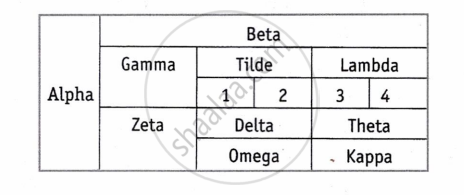
Solutions for 4: HTML- II: Images, Links and Tables
Sumita Arora solutions for Computer Applications [English] Class 10 chapter 4 - HTML- II: Images, Links and Tables
Shaalaa.com has the CBSE Mathematics Computer Applications [English] Class 10 CBSE solutions in a manner that help students grasp basic concepts better and faster. The detailed, step-by-step solutions will help you understand the concepts better and clarify any confusion. Sumita Arora solutions for Mathematics Computer Applications [English] Class 10 CBSE 4 (HTML- II: Images, Links and Tables) include all questions with answers and detailed explanations. This will clear students' doubts about questions and improve their application skills while preparing for board exams.
Further, we at Shaalaa.com provide such solutions so students can prepare for written exams. Sumita Arora textbook solutions can be a core help for self-study and provide excellent self-help guidance for students.
Concepts covered in Computer Applications [English] Class 10 chapter 4 HTML- II: Images, Links and Tables are Introduction to HyperText Markup Language (HTML), HTML Structure, Getting Started With HTML Programming, Basics of HTML Tags, Style Tags, Lists in HTML, Images in HTML, Links in HTML, Superscript and Subscript in HTML, Tables in HTML, Forms in HTML, Cascading Style Sheets in HTML, Embed Audio and Video in HTML Page, Different Controls Supported by HTML Form.
Using Sumita Arora Computer Applications [English] Class 10 solutions HTML- II: Images, Links and Tables exercise by students is an easy way to prepare for the exams, as they involve solutions arranged chapter-wise and also page-wise. The questions involved in Sumita Arora Solutions are essential questions that can be asked in the final exam. Maximum CBSE Computer Applications [English] Class 10 students prefer Sumita Arora Textbook Solutions to score more in exams.
Get the free view of Chapter 4, HTML- II: Images, Links and Tables Computer Applications [English] Class 10 additional questions for Mathematics Computer Applications [English] Class 10 CBSE, and you can use Shaalaa.com to keep it handy for your exam preparation.
