Advertisements
Advertisements
Question
Insert the <OL> tag (ordered list) around the following list text.
e. Story Books
f. Computer Books
g. Text Books
h. General Books
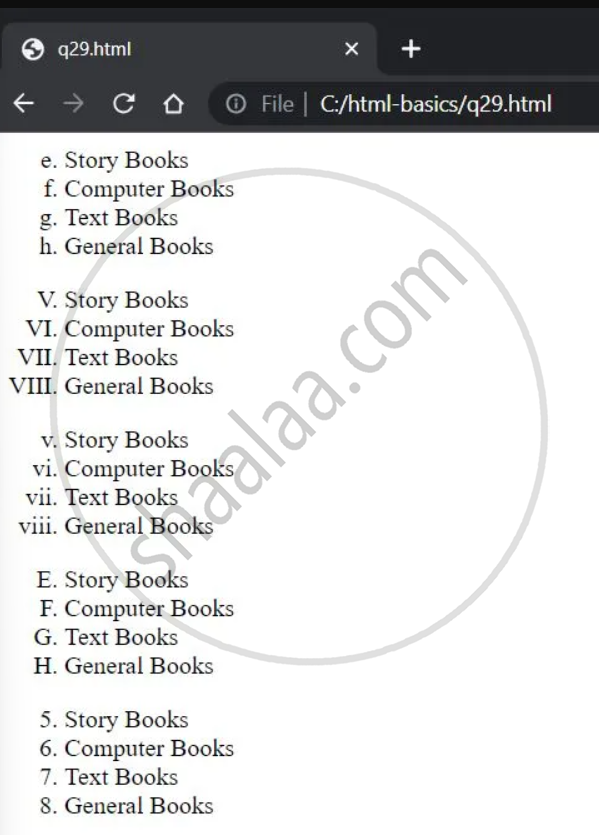
Change the style of the bullets : e.g., I, i, A and 1,2
Code Writing
Diagram
Advertisements
Solution
<OL TYPE = "a" START = "5">
<LI> Story Books </LI>
<LI> Computer Books </LI>
<LI> Text Books </LI>
<LI> General Books </LI>
</OL>
<OL TYPE = "I" START = "5">
<LI> Story Books </LI>
<LI> Computer Books </LI>
<LI> Text Books </LI>
<LI> General Books </LI>
</OL><OL TYPE = "i" START = "5">
<LI> Story Books </LI>
<LI> Computer Books </LI>
<LI> Text Books </LI>
<LI> General Books </LI>
</OL><OL TYPE = "A" START = "5">
<LI> Story Books </LI>
<LI> Computer Books </LI>
<LI> Text Books </LI>
<LI> General Books </LI>
</OL><OL TYPE = "1" START = "5">
<LI> Story Books </LI>
<LI> Computer Books </LI>
<LI> Text Books </LI>
<LI> General Books </LI>
</OL>Output:
shaalaa.com
Is there an error in this question or solution?
