Advertisements
Advertisements
Question
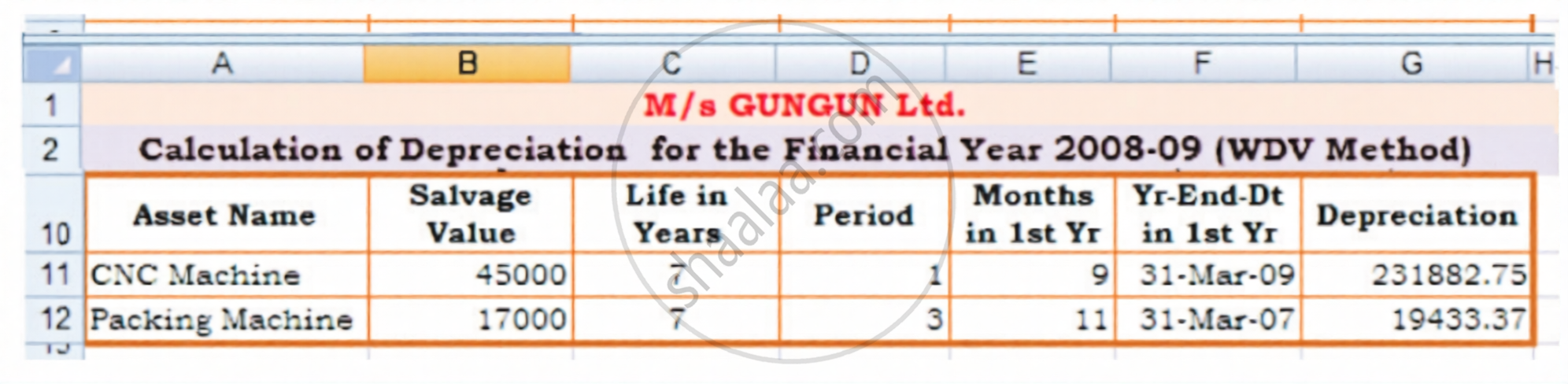
In columns g of the spreadsheet shown in Figure 3.8 b for the depreciation calculation using WDV method (i.e. using DB function), the absolute addresses of cell F3 is used. Taking the relative address of F3 instead of its absolute address will lead to the wrong result when the formula is copied. Explain the reason and write down the values copied along with the correct values which should have been copied.
Very Long Answer
Advertisements
Solution
- Reason for the Wrong Result: The default behaviour of Excel is to use relative referencing. When you copy a formula down from row 11 to row 12, Excel automatically increments all relative row numbers by one. If cell F3 is entered as a relative reference (F3) instead of an absolute reference (F3), copying the formula down to the next row changes the reference to F4. Since the required constant parameter is fixed in cell F3, referencing cell F4 (which may be empty, contain a text header, or hold an irrelevant value) will break the formula logic and produce an incorrect result or a #VALUE! error.
- Values Copied vs. Correct Values:
- Incorrect Value Copied (Relative Reference):
- Cell reference changes to: F4
- Result: Excel will read whatever data is present in cell F4 instead of the required constant.
- Correct Value That Should Have Been Copied (Absolute Reference):
- Cell reference remains locked as: F3
- Result: Excel safely preserves the connection to the constant parameter located in cell F3 across all rows.
- Incorrect Value Copied (Relative Reference):
shaalaa.com
Is there an error in this question or solution?
