Advertisements
Advertisements
Questions
Explain memory register map of 8051 Micro-controller with diagram.
Explain the memory register mapping for 8051 Micro-controller with neat diagram.
Diagram
Explain
Advertisements
Solution
- The 8051 addresses has two separate memory spaces:
- Program memory space.
- Data memory space.
- The memory map for the 8051 is illustrated in the following image.
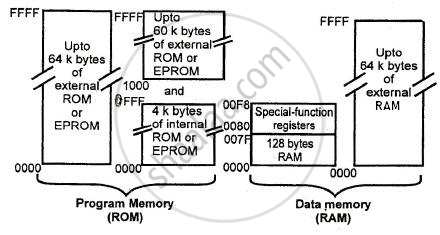
- The program's memory area is read-only memory (ROM).
- This memory area is meant for storing programs and variable data.
- The CPU can read program instructions from this memory but not write data to it.
- All instruction fetches come from the program memory area.
- The data memory space supports both read and write operations.
- The processor has the ability to read data from and write to this memory area.
- It cannot run instructions from this memory section. This memory area contains the internal RAM for the 8051.
- The internal RAM contains 128 bytes for general read/write data storage. Some of this is due to memory space.
- The 8051 contains 22 special function registers that are not part of the 128-byte RAM. They occupy memory spaces ranging from 80H to F8H. These registers are utilized for the appropriate purpose.
- The 4K byte program memory can be increased by an extra 60k bytes, resulting in 64K byte program memory. The data memory can be increased up to 64K bytes.
- The 8051 can also be used with shared memory. In this example, the 8051 has 64K bytes of total external memory. In this configuration, the 8051 may accept a block of data via its serial communications port, store that data in memory, and then execute it as a program. This is referred to as a downloaded software. It is a relatively frequent technique for changing the program running in a remote microprocessor-based controller.
shaalaa.com
Is there an error in this question or solution?
2018-2019 (March) Set 1
