Advertisements
Advertisements
Question
Create a form as given below by using different Form tags and attributes.
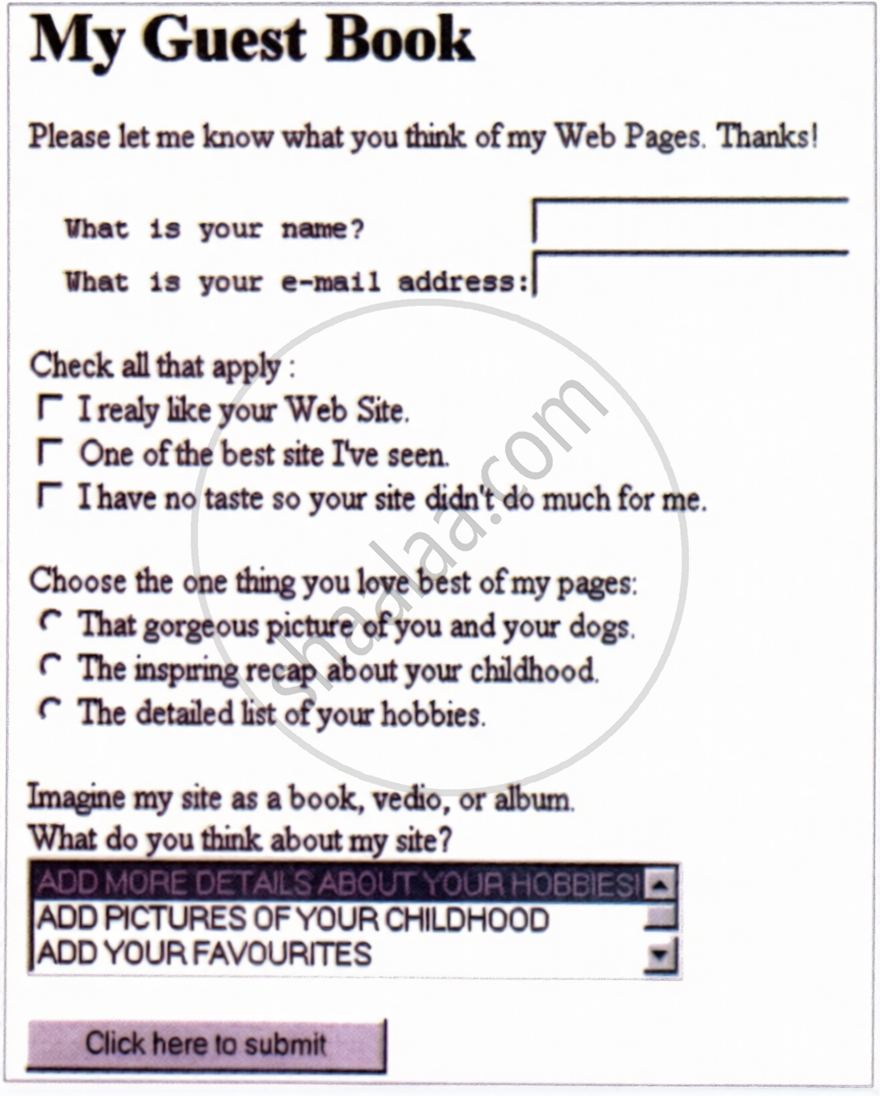
(Hint: Also use Pre, Input, Select, Option tags for this)
Code Writing
Advertisements
Solution
<HTML>
<BODY>
<FORM>
<H1> My Guest Book </H1>
<P>
Please let me know what you think of my Web Pages. Thanks !
</P>
<TABLE BORDER = "0" RULES = "NONE" FRAME = "VOID">
<TR>
<TD> <PRE>What is your name ?</PRE> </TD>
<TD> <INPUT TYPE = "TEXT" NAME = "NAME" /> </TD>
</TR>
<TR>
<TD> <PRE>What is your e-mail address :</PRE> </TD>
<TD> <INPUT TYPE = "TEXT" NAME = "EMAILID" /> </TD>
</TR>
</TABLE>
<BR>
Check all that apply:
<BR>
<INPUT TYPE = "CHECKBOX" ID = "C1" NAME = "C1" VALUE = "I really like your Web Site.">
<LABEL FOR = "C1">I really like your Web Site.</LABEL>
<BR>
<INPUT TYPE = "CHECKBOX" ID = "C2" NAME = "C2" VALUE = "One of the best site I've seen.">
<LABEL FOR = "C2">One of the best site I've seen.</LABEL>
<BR>
<INPUT TYPE = "CHECKBOX" ID = "C3" NAME = "C3" VALUE = "I have no taste so your site didn't do much for me.">
<LABEL FOR = "C3">I have no taste so your site didn't do much for me.</LABEL>
<BR>
<BR>
Choose the one thing you love best of my pages:
<BR>
<INPUT TYPE = "RADIO" ID = "O1" NAME = "OPINION"
VALUE = "That gorgeous picture of you and your dogs.">
<LABEL FOR = "O1">That gorgeous picture of you and your dogs.</LABEL>
<BR>
<INPUT TYPE = "RADIO" ID = "O2" NAME = "OPINION"
VALUE = "The inspiring recap about your childhood.">
<LABEL FOR = "O2">The inspiring recap about your childhood.</LABEL>
<BR>
<INPUT TYPE = "RADIO" ID = "O3" NAME = "OPINION"
VALUE = "The detailed list of your hobbies.">
<LABEL FOR = "O3">The detailed list of your hobbies.</LABEL>
<BR>
<BR>
Imagine my site as a book, video or album.
<BR>
What do you think about my site?
<BR>
<SELECT NAME = "DETAILS" SIZE = "3">
<OPTION VALUE = "ADD MORE DETAILS ABOUT YOUR HOBBIES!" SELECTED>
	ADD MORE DETAILS ABOUT YOUR HOBBIES!
</OPTION>
<OPTION VALUE = "ADD PICTURES OF YOUR CHILDHOOD">
	ADD PICTURES OF YOUR CHILDHOOD
</OPTION>
<OPTION VALUE = "ADD YOUR FAVOURITES">
	ADD YOUR FAVOURITES
</OPTION>
</SELECT>
<INPUT TYPE = "SUBMIT" NAME = "SUBMIT" VALUE = "Click here to submit" />
</FORM>
</BODY>
</HTML>
shaalaa.com
Is there an error in this question or solution?
Chapter 5: HTML- III: Audio, Video and Forms - Assignment [Page 234]
