Advertisements
Online Mock Tests
Chapters
1: Internet Basics
2: Internet Services and Mobile Technologies
*: Case Study Based Questions Unit I: Networking
Unit II
3: HTML- I: Basic HTML Elements
4: HTML- II: Images, Links and Tables
▶ 5: HTML- III: Audio, Video and Forms
6: Cascading Style Sheets (CSS)
*: Case Study Based Questions Unit II: HTML
Unit III
7: Cyberethics
*: Case Study Based Questions Unit III: Cyber Ethics
Chapter #: Assertion and Reasoning Questions
![Sumita Arora solutions for कम्प्युटर अँप्लिकेशन [इंग्रजी] इयत्ता १० chapter 5 - HTML- III: Audio, Video and Forms - Shaalaa.com](/images/computer-applications-english-class-10_6:75861902bcdf4cae915c246d575e285b.jpg "Sumita Arora solutions for कम्प्युटर अँप्लिकेशन [इंग्रजी] इयत्ता १० chapter 5 - HTML- III: Audio, Video and Forms")
Advertisements
Solutions for Chapter 5: HTML- III: Audio, Video and Forms
Below listed, you can find solutions for Chapter 5 of CBSE Sumita Arora for कम्प्युटर अँप्लिकेशन [इंग्रजी] इयत्ता १०.
Sumita Arora solutions for कम्प्युटर अँप्लिकेशन [इंग्रजी] इयत्ता १० 5 HTML- III: Audio, Video and Forms Assisted Practice [Pages 228 - 231]
Section A: Objective Type Questions
Which of the following is/are not valid tag(s) for inserting audio files in an HTML page?
embed
audio
sound
music
Which of the following is/are not valid tag(s) for inserting video files in an HTML pages?
embed
video
movie
VID
Which are the ways to add an audio file in a web page?
Linking via <A>
Embedding via <EMBED>
Embedding via <VIDEO>
All of these
Which are the ways to add a video file in a web page?
Linking via <A>
Embedding via <EMBED>
Embedding via <VIDEO>
All of these
Any tag allowed inside a <body> tag is allowed inside a <form> tag.
True
False
A form has two required attributes. These are:
Method and Action
Get and Post
Start and Stop
Begin and End
The tag has several kinds of controls which are dictated by the ______ attribute.
SRC
value
name
type
It is possible to set the width of a text by specifying a ______ attribute.
limit
size
value
maxlength
Which of the following tags will clear the contents of the form?
<INPUT TYPE="CLEAR" VALUE="Clear the form"><INPUT TYPE="SUBMIT" VALUE="Clear the form"><INPUT TYPE="RESET" VALUE="Clear the form"><INPUT TYPE="BUTTON" VALUE= "Clear the form">
Consider the following form control in an HTML form:
☆ Male
☆ Female
Now choose the correct line of code for the above:
<input type = "radio" name= "Gender" value= “male">Male<br>
<input type = "radio" name= "Gender" value= "female">Female<br>
<input type = "radiobutton" name = "Gender" value= "male">Male<br> <input type = "radiobutton” name = "Gender" value= "female”>Female<br><input type = "radio", name = "Gender">< value= "male">Male <input type = "radio”, name = "Gender">< value= “female”>Female<input type = "radio" name= "Gender"value= "male"><br> <input type = "radio" name= "Gender" value = "female"><br>
A developer can restrict the values accepted in a text field by specifying a ______ attribute.
size
maxlength
value
You cannot restrict text values using HTML
You can mask the input typed into a text field by specifying an <input> tag as ______.
password
secure
invisible
hidden
Tag to create password field in HTML document:
<password>
<input>
<pwd>
<pword>
HTML provides an attribute for the <input> tag that allows you to hide data with some designated character to make it secure.
True
False
Which of the following tag is used to define options in a drop-down selection list?
<select>
<list>
<dropdown>
<option>
Which of the following restricts a user to one selection?
checkbox
optionbox
radio button
drop down list
You can pre-select a radio button by utilizing a ______ attribute.
select
choice
checked
marked
If you want to display a list of 200 countries which control should you use:
radio button
checkbox
select list
slide widget
SECTION B: Theoretical Questions
In a webpage, an audio file is embedded using element as per following code. But when HTML page is opened in Chrome browser, nothing is shown. What could be the possible reason?
<audio src="beyonce.mp3" >
   Your browser does not support
   AUDIO element.
</audio>
What is the similarity between text box control and text area control?
What is the difference between text box control and text area control?
Differentiate check box and radio button.
How is a password text box different from ordinary text box?
How is form data processed when the form is submitted?
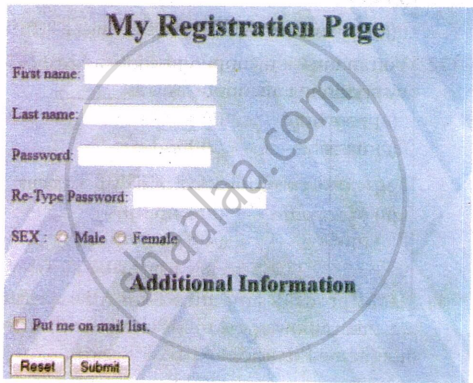
Create a form like the one shown.
SECTION C: Application Oriented Problems (Summative Assessment)
In the table below, in left column you will find some web form screenshots and in right column some HTML code. Match the code of right column with the appropriate screenshot in the left column.
| (a) | 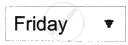 |
1. |
|
| (b) |  |
2. |
|
| (c) |  |
3. |
|
| (d) |  |
4. |
|
| (e) | 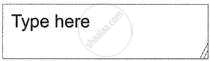 |
5. |
|
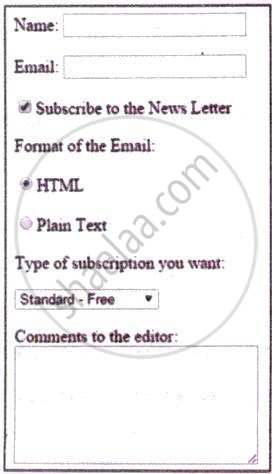
Given a form as shown below. Write code to get a form equivalent to this:
Sumita Arora solutions for कम्प्युटर अँप्लिकेशन [इंग्रजी] इयत्ता १० 5 HTML- III: Audio, Video and Forms Assignment [Pages 233 - 235]
Type A: Theoretical Questions
Name some popular audio formats.
Name some popular video formats.
Name the tags that can be used to insert audio files in a webpage.
What character is displayed on the password forms when the user inputs characters?
a random character
a ‘+’ character
an asterisk
a dot
What attribute is used for radio buttons?
radio button
radiob
radio
option button
What attributes are valid for textarea input?
just name
name, columns and rows
name and rows
columns and rows
What attributes can be used with the SELECT form?
name and multiple
name, multiple, rows and cols
name, multiple and size
multiple and size
Is the size attribute valid for the submit button?
Yes
No
The two most important attributes of a form are ______.
Id and action
Class and method
Action and method
method and id
A label’s for attribute should match the input’s ______.
type
id
name
size
Creates blank text field, but shows the text as asterisks.
Type="text"
Type="hidden"
Type="password"
Type="null"
Method attribute will always post data into the browser.
True
False
Checkbox buttons let users select one or more of a particular set of choices.
True
False
<input type="submit" name="submit" id="submit" /> creates a reset button.
True
False
What are forms?
What do you understand by controls in forms?
Name different control types supported by HTML forms.
Write the tag to define the following:
A text box
Write the tag to define the following:
A text area
Write the tag to define the following:
A radio button
Write the tag to define the following:
A check box
Write the tag to define the following:
A Password box
Write the tag to define the following:
A pop up box
Write the tag to define the following:
Submit button
Write the tag to define the following:
A Label
Write HTML code to produce following controls:
| Grade: | A | B | C |
| Subjects: | English | Maths | |
| Computers | Accounts | ||
| Economics | |||
| Business Studies |
Write HTML code to produce this control:
a text box
Write HTML code to produce this control:
a text area with 10 rows and 30 columns
Write HTML code to produce this control:
A password text box
Write HTML code to produce this control:
A pop up box to choose class from it
Type B: Application Oriented Questions
Create a form as given below by using different Form tags and attributes.
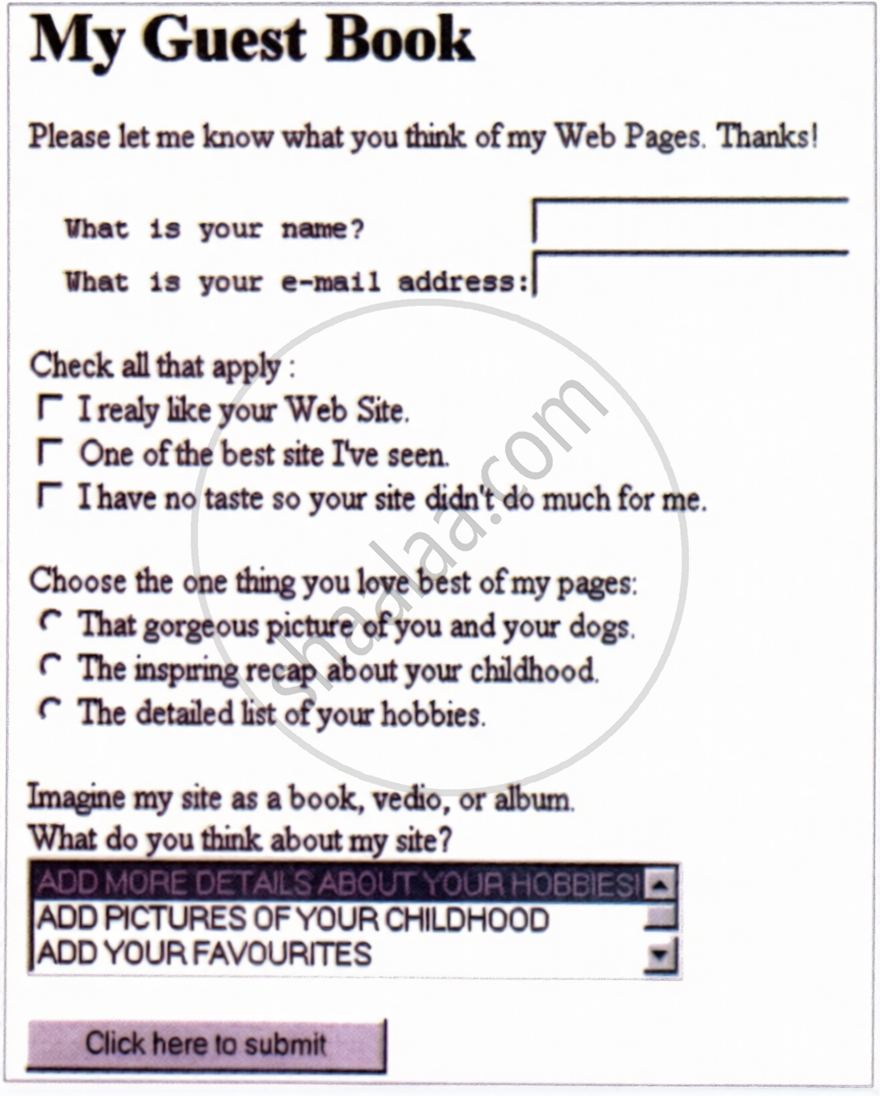
(Hint: Also use Pre, Input, Select, Option tags for this)
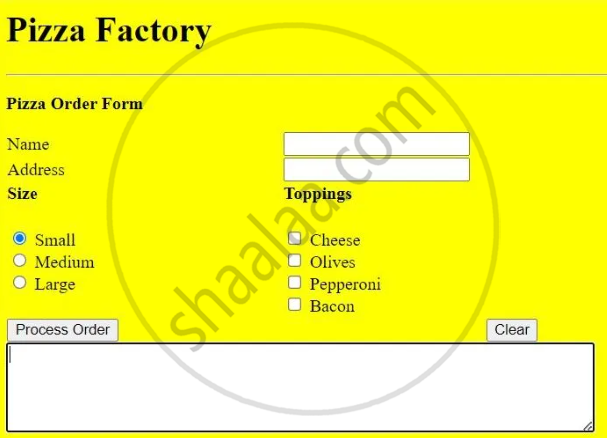
Create a webpage that receives pizza orders through a web form as shown below:
Formative Assessment
Consider the following code fragment and determine how this code fragment would create a form element, i.e., draw how its output would appear in the browser.
<input type="text" size="3" maxlength="3">
<input type="text" size="2" maxlength="2">
<input type="text" size="4" maxlength="4">Consider the following code fragment and determine how this code fragment would create a form element, i.e., draw how its output would appear in the browser.
<input type="text" name="text1">Consider the following code fragment and determine how this code fragment would create a form element, i.e., draw how its output would appear in the browser.
<textarea cols="30" rows="6" name="textarea"> Please enter text </textareaConsider the following code fragment and determine how this code fragment would create a form element, i.e., draw how its output would appear in the browser.
<select name="colors">
<option>Red</option>
<option>Blue</option>
<option>Green</option>
<option>Orange</option>
</select>Consider the following code fragment and determine how this code fragment would create a form element, i.e., draw how its output would appear in the browser.
<select name="colors" size="4">
<option>Red</option>
<option>Blue</option>
<option>Green</option>
<option>Orange</option>
</select>Consider the following code fragment and determine how this code fragment would create a form element, i.e., draw how its output would appear in the browser.
Male
<input type="radio" value="male"><br>
Female
<input type="radio" value="female">Consider the following code fragment and determine how this code fragment would create a form element, i.e., draw how its output would appear in the browser.
Male
<input type="radio" value="male"><br>
Female
<input type="radio" value="female" checked>Consider the following code fragment and determine how this code fragment would create a form element, i.e., draw how its output would appear in the browser.
YES
<input type="checkbox" value="yes"><br>
NO
<input type="checkbox" value="no">Consider the following code fragment and determine how this code fragment would create a form element, i.e., draw how its output would appear in the browser.
YES
<input type="checkbox" value="yes" checked><br>
NO
<input type="checkbox" value="no">Solutions for 5: HTML- III: Audio, Video and Forms
Sumita Arora solutions for कम्प्युटर अँप्लिकेशन [इंग्रजी] इयत्ता १० chapter 5 - HTML- III: Audio, Video and Forms
Shaalaa.com has the CBSE Mathematics कम्प्युटर अँप्लिकेशन [इंग्रजी] इयत्ता १० CBSE solutions in a manner that help students grasp basic concepts better and faster. The detailed, step-by-step solutions will help you understand the concepts better and clarify any confusion. Sumita Arora solutions for Mathematics कम्प्युटर अँप्लिकेशन [इंग्रजी] इयत्ता १० CBSE 5 (HTML- III: Audio, Video and Forms) include all questions with answers and detailed explanations. This will clear students' doubts about questions and improve their application skills while preparing for board exams.
Further, we at Shaalaa.com provide such solutions so students can prepare for written exams. Sumita Arora textbook solutions can be a core help for self-study and provide excellent self-help guidance for students.
Concepts covered in कम्प्युटर अँप्लिकेशन [इंग्रजी] इयत्ता १० chapter 5 HTML- III: Audio, Video and Forms are Introduction to HyperText Markup Language (HTML), HTML Structure, Getting Started With HTML Programming, Basics of HTML Tags, Style Tags, Lists in HTML, Images in HTML, Links in HTML, Superscript and Subscript in HTML, Tables in HTML, Forms in HTML, Cascading Style Sheets in HTML, Embed Audio and Video in HTML Page, Different Controls Supported by HTML Form.
Using Sumita Arora कम्प्युटर अँप्लिकेशन [इंग्रजी] इयत्ता १० solutions HTML- III: Audio, Video and Forms exercise by students is an easy way to prepare for the exams, as they involve solutions arranged chapter-wise and also page-wise. The questions involved in Sumita Arora Solutions are essential questions that can be asked in the final exam. Maximum CBSE कम्प्युटर अँप्लिकेशन [इंग्रजी] इयत्ता १० students prefer Sumita Arora Textbook Solutions to score more in exams.
Get the free view of Chapter 5, HTML- III: Audio, Video and Forms कम्प्युटर अँप्लिकेशन [इंग्रजी] इयत्ता १० additional questions for Mathematics कम्प्युटर अँप्लिकेशन [इंग्रजी] इयत्ता १० CBSE, and you can use Shaalaa.com to keep it handy for your exam preparation.
