Advertisements
Online Mock Tests
Chapters
1: Internet Basics
2: Internet Services and Mobile Technologies
*: Case Study Based Questions Unit I: Networking
Unit II
▶ 3: HTML- I: Basic HTML Elements
4: HTML- II: Images, Links and Tables
5: HTML- III: Audio, Video and Forms
6: Cascading Style Sheets (CSS)
*: Case Study Based Questions Unit II: HTML
Unit III
7: Cyberethics
*: Case Study Based Questions Unit III: Cyber Ethics
Chapter #: Assertion and Reasoning Questions
![Sumita Arora solutions for कम्प्युटर अँप्लिकेशन [इंग्रजी] इयत्ता १० chapter 3 - HTML- I: Basic HTML Elements - Shaalaa.com](/images/computer-applications-english-class-10_6:75861902bcdf4cae915c246d575e285b.jpg "Sumita Arora solutions for कम्प्युटर अँप्लिकेशन [इंग्रजी] इयत्ता १० chapter 3 - HTML- I: Basic HTML Elements")
Advertisements
Solutions for Chapter 3: HTML- I: Basic HTML Elements
Below listed, you can find solutions for Chapter 3 of CBSE Sumita Arora for कम्प्युटर अँप्लिकेशन [इंग्रजी] इयत्ता १०.
Sumita Arora solutions for कम्प्युटर अँप्लिकेशन [इंग्रजी] इयत्ता १० 3 HTML- I: Basic HTML Elements Assisted Practice [Pages 119 - 126]
HTML is acronym for ______.
High Text Marker Language
Higher Text Markup Language
Hyper Text Markup Language
Hyper Transfer Makeup Language
A coded HTML command that indicates how part of a web page is displayed is call ______.
Attribute
Tag
Style
All of these
Which of the following tags identifies the document as an HTML document?
<HTML>
<HEAD>
<BODY>
<P>
The tags that require a starting as well as ending tag are called ______.
Pair element
Twin Element
Container Element
Empty Element
Which sequence of HTML tags is correct?
<html><head><title></title></head><body></body></html><html><head><title><body></title></head></body></html><html><head><title></head><body></body></title></html><html><head><title><body></body></title></head></html>
To specify the background image for the document, Background attribute is used with which of the following tags?
<BODY>
<HTML>
<P>
None of these
To define the basic font size, which of the following tag is used?
SIZE
BASEFONT
FONT
All of these
The unnumbered lists can be created by ______ tag.
<UL>
<OL>
<LI>
Both (a) and (b)
Both (a) and (c)
Both (b) and (c)
The numbered lists can be created by ______ tag.
<UL>
<OL>
<LI>
Both (a) and (b)
Both (a) and (c)
Both (b) and (c)
Consider the following HTML code:
<ol type='i'>
<li>First</li>
<li>Second</li>
<li>Third</li>
<li>Fourth</li>
</ol>
Choose the correct output that would be shown upon execution of the above code, from the choices given below:
- First
- Second
- Third
- Fourth
- First
- Second
- Third
- Fourth
- First
- Second
- Third
- Fourth
- First
- Second
- Third
- Fourth
We can create a numbered list using the ______ tag.
<UL>
<list>
<OL>
<DL>
Identify which of the following type of list will create a bulleted list.
Unordered
Ordered
Definition
Numbered
In <OL> and <UL>, the style of bullet or number is defined by ______.
type attribute
style attribute
both (a) and (b)
None of the above
Which of the following will produce a solid circle bullet when given as value of type with?
disc
circle
square
none of these
Tag (s) required to create Description lists in HTML ______.
<DL>
<DL>
<DD>
All of the above
An advantage of using basic HTML to create a document is that ______.
all word processors can display the document
all browsers can display the document
it will print better than a word processing document
it is easier to write in HTML
Factors that affect how an HTML document looks on the monitor do not include ______.
operating system
window size
color depth
html tags
Every HTML document must include the tags ______.
<html> </html>& <body> </body><body> </body> & at least one <p><html> </html> & <head> </head>
If the HTML code looks like:
<font face="Arial" size="3" color="#000000">Welcome</font>then the text would look like:
Welcome
Welcome
Welcome
Welcome
Which attribute is not valid for <BODY> tag?
background
color
vlink
leftmargin
Which attribute is NOT valid for the <body> tag?
background
color
vlink
bgcolor
Which of these is NOT an attribute of the font tag?
color
face
type
size
How can you make a text appear bold?
<b> text</b>
<strong> text</strong>
both (a) and (b)
neither
Choose the correct HTML tag to make a text italic
<italic>
<i>
<italicise>
all of these
If the background image is smaller than the screen, what will happen?
It will be stretched
It will leave a blank space at the bottom of your page
It will be repeated
The <title> tag belongs where in your HTML?
Head
Arm
Body
Foot
Choose the correct HTML tag for the largest heading
<heading>
<h6>
<head>
<h1>
Besides, <B> another way to make text bold is what?
<strong>
<dark>
<fat>
foot
Why should you specify a background color if you are using an image for the actual background of your page?
The background color will be shown until the image loads.
In case the image doesn't fit right.
So the text shows up better.
All normal webpages consist of what two parts?
Head and body
Top and bottom
Body and frameset
Container elements in HTML require ______.
Starting tag
Ending tag
Starting and Ending tag
None of these.
Background attribute of <BODY> is used to ______.
give background color to web page.
load an image and use it as a background when displaying webpage.
insert an image within web page.
none of these.
With which HTML tag do you apply attributes that modify text size, font-face, and color?
<font><mod><f><text>
Which HTML tag would you apply the bgcolor attribute to in order to change the background color of the web page?
<html><head><body><p>
Gagandeep has written the following code to display an image in the background of HTML document:
<BODY BgGround = "Animals.jpeg">
but he is not getting the desired output. Help him in identifying correct code from the following :
<BODY Bg = "Animals.jpeg"><BODY BACK = "Animals.jpeg"><BODY BGIMAGE = "Animals.jpeg"><BODY BACKGROUND = "Animals.jpeg">
In which section of an HTML document do you enter the <P> element?
The body section
The footer section
The style sheet
The head section
In which HTML element do you apply attributes that modify the background image?
The
<html>element.The
<headl>element.The
<background>element.The
<body>element.
Which of the following heading tags will cause a browser to render text at the largest default size?
<h3>
<h2>
<h5>
<h4>
Which is the correct way to comment out something in HTML?
Using ## and #
Using <!-- and >
Using </-- and -/->
Using <!-- and -I>
Which of the following is the proper syntax to start an HTML comment?
<!--
<!>
<comment>
<notate>
Which one of the following is the HTML tag used to insert a horizontal rule?
<h1><hr><rule><br>
HTML tag to draw horizontal line ______.
<hl>
<hr>
<hline>
None of the above
What HTML container tags do you apply to text to format the text as a paragraph?
<para></para>
<text></text>
<p></p>
<format style="para"></format>
HTML provides us with ______ levels of headings that can be inserted into a web page.
5
6
7
8
Which of the following options is an INVALID attribute of <font> tag in HTML?
face
width
size
color
Which HTML tags cause browsers to rendertext as italics?
<text style = "italics"></text>
<ital></ital>
<i></i>
<b></b>
Intrepret this statement ______.
It makes Michelle strong
It highlights Michelle as being strong
It will print out Michelle in bold font
It will print strong Michelle/strong
Which one is correct?
<b>Click Here<b>
<strong>Click Here<strong>
<b>Click Here</b>
</strong>Click Here</strong>
The page title is inside the ______.
Body
Head
Division
Table
To align multiple lines of text we use ______.
Justify
DIV
Align
None of these.
The value of #FFFFFF is ______.
Black
White
Red
none of the above.
The value of #000000 is ______.
Black
White
Red
none of the above
In HTML, lists can be of ______.
unnumbered
numbered
definition
all of these
To start a list at the count of 3, use which?
<ol start="3">
<ol begin="3">
<ol list="5">
Which of the following is the correct way to create a list using the lowercase letters?
<ol alpha =a" ><ol type = "a"><ol letter = "a">None of the above
What is the correct HTML for adding a background color?
<body background="yellow">
<background>yellow</background>
<body style="background-color:white">
<body bgcolor="white">
To create a bulleted list use?
<il><ul>
<ol>
When making bulleted lists you have what options?
disc, circle, square
triangle, square, circle
square, disc, polygon
Which one of the following is the list type that will create a bulleted list?
unordered
option
decorated
ordered
The default starting value for an ordered list in HTML is ______.
i
1
a
.
HTML is a ______.
Package
Software
Language
None of these
Choose the correct HTML tag to make the tex bold?
<B>
<BOLD>
<STRONG>
Both (a) & (c)
Choose the correct HTML tag for the largest heading?
<H1>
<H6>
<H10>
<HEAD>
Which of the following will result in the largest text size?
<H3>
<H6>
<H2>
<H4>
State True or False:
<BR> tag has its closed tag as </BR>
State True or False:
<P> tag has no closing tag
State True or False:
<HR> tag is same as <BR>
State True or False:
<KBD> tag is used to display tables
In <BR> tag resets the paragraph alignment to the default left alignment. True or False?
The textual content that appears in the source HTML document but is not rendered by the browser is called ______.
Comments are enclosed in ______ and tags.
By defaultproduces ______ a rule.
______ text styles are handled in its own way by the browsers.
To display an & on the web page, ______ is used in the source HTML code.
Two tags break the line flow. These are ______ and ______.
Background colour is set by ______ attribute and background graphics is set by ______ attribute of ______ tag.
An element that only has a starting tag and no ending tag is ______ element.
Section B: Theoretical Questions.
Write a sample HTML code to display an address in exactly the same way as given here:
What is the difference between container tags and empty tags?
Can you assign justified alignment to a paragraph in HTML?
What is the difference between <BASEFONT> and <FONT> tags?
What are logical text styles?
What are physical text styles?
Write the difference between <OL> and <UL> tags in HTML. Also write suitable examples of each to illustrate the difference.
What is wrong with following coding?
<OL type = "a" start = "d">
What is wrong with following coding?
<UL type = "a" start = 4>
Differentiate between container and empty elements of HTML.
Identify the errors and write the corrected HTML statements:
<BODY BACKGROUND="Red"><FONT TYPE="Arial">
Section C: Application Oriented Problems (Summative Assessment)
Consider the following web page:
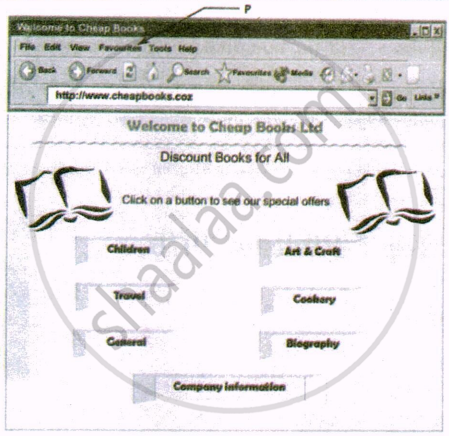
- The address of this website is ______.
- Welcome to Cheap Books
- Welcome to Cheap Books
- Company information
- www.cheapbooks.com
- The menu at P can be used to ______.
- send an attachment to a mailing list
- copy and paste the information
- save the page on a disk
- bookmark the web page
- To use the Internet to go to other web pages available through buttons the user should use ______.
- directory search tools
- find and replace
- a search engine
- click on hyperlinks
- The type of software application used to view this web page is ______.
- browser
- database
- spreadsheet
- word processing
Consider the following web page:
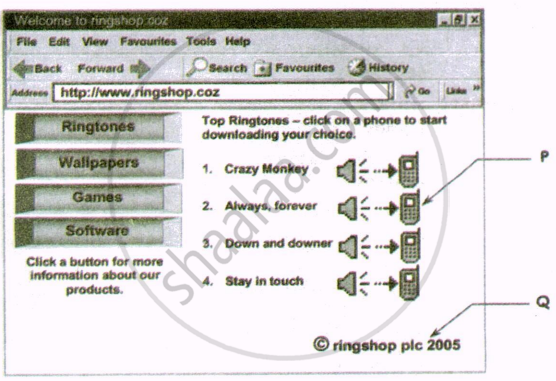
- www.ringshop.com is ______.
- a link
- an email address
- a website address
- a teletext address
- The image at P is a ______.
- search engine
- bullet point
- hyperlink
- hotspot
- The symbol in the line of text at Q means that this web page is ______.
- copied
- current
- copyright
- confidential
- Which of the following tags, do you think is/are used to create the list shown in the web page?
- List
- OL and LI
- UL and LI
- OL and START
Carefully study the Webpage given below. Identify 10 tags (structural as well asformatting tags) that have been utilized in creating this webpage and write the usage of each of them.
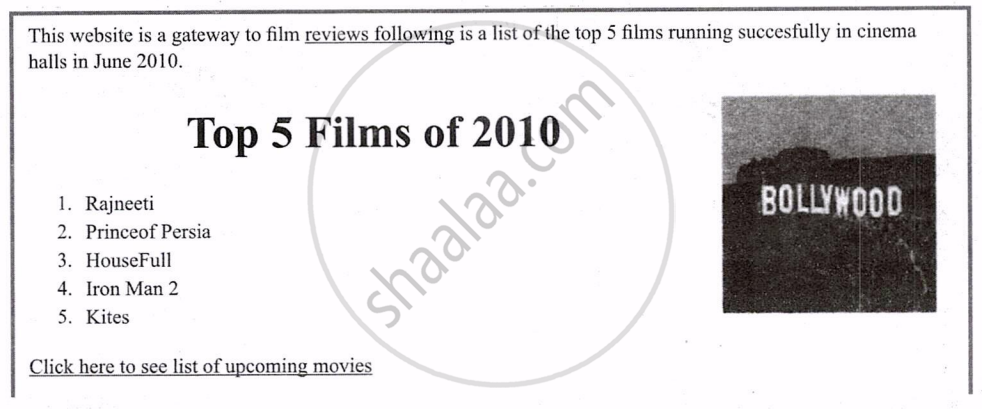
Write HTML code to display the unordered list (with square bullets) of two cities “DELHІ” and “MUMBAI”. The web page should have a yellow background and the title of the page should be ‘My Cities’.
Sumita Arora solutions for कम्प्युटर अँप्लिकेशन [इंग्रजी] इयत्ता १० 3 HTML- I: Basic HTML Elements Assignment [Pages 127 - 129]
Type A: Theoretical Questions
HIML stands for ______.
What do you understand by ‘Tag’?
What is an attribute in HTML?
Define the tag, <HTML>?
HR tag is used for ______.
<TITLE> tag is used to define ______.
What is the basic structure of HTML File?
Face attribute is used with ______ tag and used for ______.
To align multiple lines of text we use ______.
Justify
DIV
Align
None of these.
What is the use of ‘size’ in <BASEFONT> tag?
List the attributes of <FONT> tag.
List and define different types of paragraph alignments.
The value of #FFFFFF is ______.
Black
White
Red
none of the above.
The value of #000000 is ______.
Black
White
Red
none of the above
State True or False:
<BR> tag has its closed tag as </BR>
State True or False:
<P> tag has no closing tag
State True or False:
<HR> tag is same as <BR>
State True or False:
<KBD> tag is used to display tables
The default alignment of text is ______ default text color is ______ and the default background color is ______.
Give the coding for giving the heading ‘PACE Computer Education’ of <H1> tag, font style as Comic Sans MS, text color as blue. Body text color as red, background as green, alignment as center, font style of body text as Brush script, size = 15. The text for body is as follows:
Education is the
ability to listen to almost
anything without
losing your temper
or your
self confidence
And so is Democracy and Maturity too.
What is wrong in the following coding?
<HEAD> <my web page>
<TITLE> Welcome to My Web Page
</HEAD>
</TITLE>
What is wrong in the following coding?
<FONT name = “Arial”
type = “Bold” size = 3>
What is wrong in the following coding?
<FONT face = comic sans ms color = Red>
What is wrong in the following coding?
<FONT color = #345678
What is wrong in the following coding?
<BODY color = “Red” background =
“Myimage.jpg”>What is wrong in the following coding?
<BR> </BR>
What is wrong in the following coding?
<P Font face = “Arial” colon = “Blue”>
What is wrong in the following coding?
<Body Margin Top = 60 Left = 75>
Text with changed margin </Body>
What is wrong in the following coding?
<BASEFONT SIZE = 5>
<BODY> Text with New format
</BODY>
What is wrong in the following coding?
<HTML>
<HEAD>
<TITLE> New Page
</HEAD>
</TITLE>
</HTML>
Differentiate between <TITLE> and <HEAD> tags.
Differentiate between container and empty elements of HTML.
Differentiate between <BR> and <P> tag.
List different types of heading tags.
Define the different heading tags in HTML.
What is the difference between basefont and font tag?
How can a 2D or 3D horizontal rule be displayed?
What are logical text styles?
What are physical text styles?
How can different tags be combined in HTML?
What is the use of combining different tags in HTML?
What all tags are required in every HTML page?
Write the HTML code for the following to appear one after the other:
- A small heading with the words, “We are Proud to Present”
- A horizontal rule across the page
- A large heading with the one word, “Orbit”
- A medium-sized heading with the words, “The Geometric Juggler”
- Another horizontal rule
Insert the appropriate line break and paragraph break tags to format the following poems with a blank line between them:
A Morning is a Wonderful Blessing,
Either Cloudy or Sunny
It stands for Hope, giving us another
Start of what we call Life.
Write a complete HTML Web page with the title “Foo Bar” and a heading at the top which reads “Happy Hour at the Foo Bar”, followed by the words “Come on down!” in regular type.
How would you say,
“We’re having our annual Impeachment Day SALE today,”
in normal sized blue text, but with the word “SALE” in the largest possible size in bright red?
What type of lists are supported by HTML?
Differentiate between ordered and unordered lists.
How will you nest an unordered list inside an ordered list?
Which three tags let you create the definition lists?
Which two tags let you create an unnumbered list?
Which two tags let you create a numbered list?
Type B: Application Oriented Questions
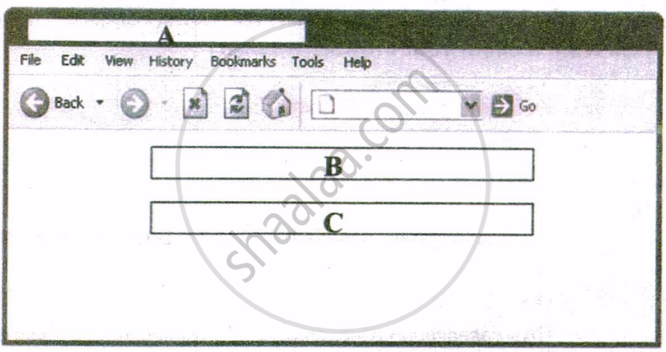
| Hamish is creating a website for the Highland Chess League. Part of the HTML for the home page is shown below. |
<head>
<title> Highland Chess League </title>
<meta name = "description" content = "The Highland Chess League"/>
<meta name = "keywords" content = "chess,league,games,Highland,hobbies"/>
</head>
<body>
<div align = "centre">
<p> Welcome to the Highland Chess League Home Page </p>
<p>Play the board <u>not</u> the man </p>
</div>
</body>
The window shown alongside is seen when a browser is used to view the home page. Use the HTML code above to identify the contents displayed in A, B and C.
The meta tag specifies keywords used by spiders of search engines. Where do you provide (inside which tag) the meta information in HTML code?
Consider the following web page:
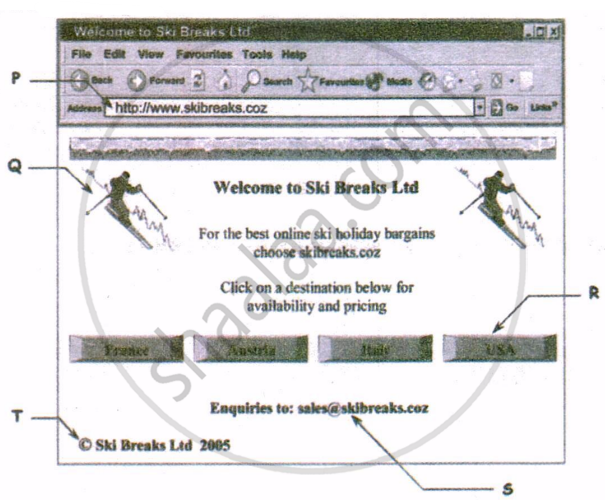
- The text at P is ______.
- a web address
- a postal address
- an email address
- an office address
- To follow a link to find information, the user should click at ______.
- P
- R
- S
- T
- The alignment of text at T is ______.
- Left
- right
- center
- same as alignment of pointer S
- The text at S provides a way to contact Ski Breaks Ltd using ______.
- fax
- post
- telephone
- To use the Internet to find more websites about winter sports, the user should use ______.
- a book
- an email
- a CD ROM
- a search engine
Sumita Arora solutions for कम्प्युटर अँप्लिकेशन [इंग्रजी] इयत्ता १० 3 HTML- I: Basic HTML Elements Practical Assessment [Pages 130 - 135]
Text inside paragraphs is displayed.
<HTML>
<BODY>
<P>
This paragraph contains a lot of lines in the source code, but the browser ignores it.
</P>
<P>
This paragraph contains a lot of spaces in the source code, but the browser ignores it.
</P>
<P>
The number of lines in a paragraph depends on the size of your browser window.
If you resize the browser window, the number of lines in this paragraph will change. </P>
</BODY>
</HTML>Use of break <BR> tag
<HTML>
<BODY>
<P>
To break<BR>lines<BR>in a<BR>paragraph<BR>use the BR tag.
</P>
</BODY>
</HTML>HTML editor ignores your formatting
<HTML>
<BODY>
<P>
My Bonnie lies over the ocean.
My Bonnie lies over the sea.
My Bonnie lies over the ocean.
Oh, bring back my Bonnie to me.
</P>
<P> Note that your browser simply ignores your formatting!</P>
</BODY>
</HTML>The heading tags.
<HTML>
<BODY>
<H1>This is heading 1</H1>
<H2>This is heading 2</H2>
<H3>This is heading 3</H3> <H4>This is heading 4</H4> <H5>This is heading 5</H5> <H6>This is heading 6</H6>
<P>Use heading tags only for headings. Don't use them to make something big.
Use other tags for that.</P>
</BODY>
</HTML>Centralized heading:
<HTML>
<BODY>
<H1 align = "center">This is heading 1</H1>
<P>The heading above is aligned to the center of this page. The heading above
is aligned to the center of this page. The heading above is aligned to the
center of this page.</P>
</BODY>
</HTML>Defining and using a horizontal rule:
<HTML>
<BODY>
<P>The hr tag defines a horizontal rule:</P>
<HR>
<P>This is a paragraph</P>
<HR>
<P>This is a paragraph</P>
<HR>
<P>This is a paragraph</P>
</BODY>
</HTML>Comments in HTML source:
<HTML>
<BODY>
<!--This comment will not be displayed--<
<P>This is a regular paragraph</P>
</BODY>
</HTML>Add a background colour
<HTML>
<BODY bgcolor = "yellow">
<H3>Look: Colored Background!</H3>
</BODY>
</HTML>Add a background image
<HTML>
<BODY background = "background.jpg">
<H3>Look: Image Background!</H3>
<P>Both gif and jpg files can be used as HTML backgrounds.</P>
<P>If the image is smaller than the	page, the image will repeat itself.</P>
</BODY>
</HTML>Text formatting
<HTML>
<BODY>
<B>This text is bold</B>
<BR>
<STRONG>This text is strong</STRONG>
<BR>
<BIG>This text is big</BIG>
<BR>
<EM>This text is emphasized</EM>
<BR>
<I>This text is italic</I>
<BR>
<SMALL>This text is small</SMALL>
<BR>
This text contains<SUB> subscript</SUB>
<BR>
This text contains
<SUP>
superscript
</SUP>
</BODY>
</HTML>
Start NotePad from Programs menu. In the opened file give coding for the following.
Give the Title Pace Computer Education. (this should appear on title bar)
Make the background colour as Grey and text colour as Red.
Give the heading My First Web Page as H1 tag, Face = Times New Roman, Color = Red, Align = Center.
Write the paragraph with <P> tag, Align = Right, Font = Comic Sans MS, Color = Blue and Size = 4.
Today, one of the major reasons businesses, homes and other users purchase computers is to gain Internet access. Many companies and organizations assume that the public is familiar with the Internet. Web addresses appear on television, in radio broadcasts, in printed news-papers, magazines and in other forms of advertising. Software companies use their Web sites as a place for you to download upgrades or enhancements to software products. To be successful today, you must have an understanding of the Internet. Without it, you are missing a tremendous resource for goods, services and information.
Create two copies of above paragraph and apply <B> tag, <IT> tag, <I> and <U> tags in between.
“Exiting Features Offered By HTML”. Give it as heading H3, Align = Left, Color = Red, Font = Comic Sans Ms.
Apply any Font style, Size = 5 on the following points:
E-Mail
Information
Discussion Groups
Online- Shopping
Entertainment
Programme
Add a horizontal rule spread on the 50% of the browser window.
Combine different font effects: <B>, <I>, <U>, and <TT>.
Select File menu and click on Save, type your file name with extension. HTML and click on Save buttton to complete the procedure of saving.
Types of ordered lists:
<HTML>
<BODY>
<H4>Numbered list:</H4>
<OL>
<LI>Apples</LI>
<LI>Bananas</LI>
</OL>
<H4>Letters list:</H4>
<OL type="A">
<LI>Apples</LI>
<LI>Bananas</LI>
<LI>Lemons</LI>
<LI>Oranges</LI>
</OL>
<H4>Lowercase letters list:</H4>
<OL type="a">
<LI>Apples</LI>
<LI>Bananas</LI>
</OL>
<H4>Roman numbers list:</H4>
<OL type="I">
<LI>Apples</LI>
<LI>Bananas</LI>
</OL>
<H4>Lowercase Roman numbers list:</H4>
<OL type="i">
<LI>Apples</LI>
<LI>Bananas</LI>
</OL>
</BODY>
</HTML>Types of unordered lists
<HTML>
<BODY>
<H4>Disc bullets list:</H4>
<UL type="disc">
<LI>Apples</LI>
<LI>Bananas</LI>
</UL>
<H4>Circle bullets list:</H4>
<UL type="circle">
<LI>Apples</LI>
<LI>Bananas</LI>
</UL>
<H4>Square bullets list:</H4>
<UL type="square">
<LI>Apples</LI>
</UL>
</BODY>
</HTML>Nested List
<HTML>
<BODY>
<H4>A nested List:</H4>
<ul>
<LI>Coffee</LI>
<LI>Tea</LI>
<ul>
<LI>Black tea</LI>
<LI>Green tea</LI<
</UL>
<LI>Juice</LI>
<LI>Milk</LI>
</UL>
</BODY>
</HTML>Definition List
<HTML>
<BODY>
<H4>A Definition List:</H4>
<DL>
<DT>Coffee</DT>
<DD>Black hot drink</DD>
<DT>Milk</DT>
<DD>White cold drink</DD>
</DL>
</BODY>
</HTML>Insert the <UL> tag around the following list text.
Basic etiquette for gentlemen for greeting a lady.
- Wait for her acknowledging bow before starting conversation.
- Walk with her if she expresses a wish to converse.
- When walking, the lady must always have the wall.
- Never make a lady stand talking in the street.
- On outing in a restaurant, first offer her a seat and then take your seat.
Insert the <OL> tag around the following list text.
II. Recourse for a lady toward unpleasant men who persist in bowing.
III. A simple stare of iciness should suffice in most instances.
IV. Her ignorance is sufficient that she is not willing to be friendly.
V. As a last resort: “Sir, I have not the honor of your acquaintance.”
Create a list of definitions using <DL>, <DT> and <DD>.
Proper Address Of Royalty
Your Majesty
To The King or Queen
Your Highness
To The King’s Children
Your Highness
To Nephews, Nieces and Cousins of the King.
Try to change the styles of bullets e.g., <UL>, <OL>.
Insert the <UL> tags (unordered list) around the following list text.
- Car
- Scooter
- Van
Change the style of the bullets: e.g., circle, square, disc.
Insert the <OL> tag (ordered list) around the following list text.
e. Story Books
f. Computer Books
g. Text Books
h. General Books
Change the style of the bullets : e.g., I, i, A and 1,2
Create a nest list as follows using both ordered and unordered list tags:
- Operating System
- Disk Operating System
- Windows
- Unix
- Linux
- MS - Office
- Word
- Excel
- PowerPoint
- Access
- OpenOffice.org
- Writer
- Calc
- Impress
- Base
- Accessories
- Paint
- Calculator
- Note Pad
- Word Pad
Apply different font styles on these lists.
Write HTML code to display an ordered list (with uppercase roman numbers) listing any three subjects being taught in your school. The web page should have a red background and the title of the page should be ‘My Subjects’.
Sumita Arora solutions for कम्प्युटर अँप्लिकेशन [इंग्रजी] इयत्ता १० 3 HTML- I: Basic HTML Elements Solved Examination Questions [Pages 136 - 138]
Fill in the blanks:
HR tag is used for ______.
______ tag is used to bring the text to new line.
______ attribute is used to define the thickness of horizontal rule.
State True or False:
<P> tag has no closing tag
State True or False:
There must be only one <body> tag in each web page.
State True or False:
Extension of an XML file is html.
State True or False:
HTML is case sensitive.
State True or False:
Line breaks are given through <BR>.
The tags that require a starting as well as ending tag are called ______.
Pair elements
Empty elements
Container elements
Twin elements
Which of the following will give largest size of text?
<h3>
<h6>
<h2>
<hd>
Attribute for choosing type of font is ______.
Character
Face
Font
Type
Which is correct to change the text colour to red?
<BODY bgcolor=red>
<BODY text=red>
<BODY color=red>
None of the above
Which sequence of HTML tags is correct?
<html><head><title></title></head><body></body></html><html><head><title><body></title></head></body></html><html><head><title></head><body></body></title></html><html><head><title><body></body></title></head></html>
Which tag is used to bring the text to next line?
<br>
<b>
<p>
<li>
Which of the following are the heading tags?
<h3>
<h6>
<h4>
All of the above
What is the full form of DTD?
Document To Definition
Dynamic To Definition
Document Type Definition
Direct Type Definition
Which attribute does not come intag?
Size
Color
Width
Length
Identify the error(s) in the following HTML code. Also write the correct code.
<BODY Color = “Red” background = ”School.jpg”>Write the HTML code to create a paragraph whose text colour is blue.
List any 2 types of alignment that can be applied on a paragraph in HTML.
What does <BODY> tag in HTML contain?
List any one attribute of tag.
Where can a comment be placed in an HTML document?
How is a comment useful in HTML?
Why are comments included in an HTML document?
How are comments written in HTML? Give an example.
What is the purpose of HTML?
To start a list with no. 3, we should write.
<OL start = 3>
<OL type = 3>
<OL value = 3>
All of the above
Write the difference between <H1> and <H6> heading tags.
Write the full form of the following tag:
<LI>
Write the full form of the following tag:
<A>
Write the full form of the following tag:
<VLINK>
Write the full form of the following tag:
<BR>
Write the full form of the following tag:
<P>
While writing HTML code, how do you find out how your web page would look like?
Distinguish between <BASEFONT SIZE> tag and <FONT SIZE> tag with the help of example of each?
Which tag is used to insert heading of third level on a web page?
Expand the tag:
<HEAD>
Expand the tag:
<TITLE>
Sumita Arora solutions for कम्प्युटर अँप्लिकेशन [इंग्रजी] इयत्ता १० 3 HTML- I: Basic HTML Elements Unsolved Examination Questions [Pages 138 - 139]
Fill in the blanks:
______ tag is used to insert a line break on a web page.
The tag ______ is used to create subscripts and ______ tag is used to create superscripts on a web page.
The document structure elements of HTML page is/are ______.
HTMLBODYHEADAll the above
Which attribute does not come intag?
SizeColourWidthLength
A software used to open web pages on the internet is called a ______.
Surfer
Portal
Browser
Provider
Anything written between ______ is taken as comment.
<?-->
<?---?>
<!--and -->
</--->
We can view the source code of a web page in ______.
MS Power Point
Internet Explorer
MS Excel
Notepad
Write the extension of HTML code file.
How would you display text in the title bar of browser?
How the font size of a single line on a web page be changed?
Distinguish between <P> tag and <BR> tag with the help of an example.
Why do we insert comments in an HTML document even though they are not displayed on a web page?
Compare Home Page and Web Site.
How can one insert horizontal lines in a Web Page?
How are comments inserted in HTML code? Explain with example.
What do you mean by the term ‘source code’ of the current page viewed in a Web Browser?
Which tag is used to change the size of text in an HTML file?
Which tag is used to change the style (face) of text in an HTML file?
Explain any two attributes used with the <FONT> tag.
What is the purpose of using the tags <H1>...<H6>?
What is the method of viewing the source code of the current page in Web Browsers?
What is the method of using comment line in HTML code?
What is the use of the <BODY> tag in HTML?
Write any two attributes used with the <BODY> tag.
Differentiate between container and empty elements used in HTML.
What is the use of the <FONT> tag in HTML?
Write about any two attributes of font tag.
Which HTML tag is used to insert an image in a page? Write an option used with this tag.
Write the full form of the following tag:
<LI>
Write the full form of the following tag:
<VLINK>
Write the full form of the following tag:
<HR>
Write the full form of the following tag:
<P>
Identify which of the following is a tag or an attribute:
- border
- img
- alt
- src
- href
Name the following with respect to HTML:
Attribute for changing bullet type of list tag.
Solutions for 3: HTML- I: Basic HTML Elements
Sumita Arora solutions for कम्प्युटर अँप्लिकेशन [इंग्रजी] इयत्ता १० chapter 3 - HTML- I: Basic HTML Elements
Shaalaa.com has the CBSE Mathematics कम्प्युटर अँप्लिकेशन [इंग्रजी] इयत्ता १० CBSE solutions in a manner that help students grasp basic concepts better and faster. The detailed, step-by-step solutions will help you understand the concepts better and clarify any confusion. Sumita Arora solutions for Mathematics कम्प्युटर अँप्लिकेशन [इंग्रजी] इयत्ता १० CBSE 3 (HTML- I: Basic HTML Elements) include all questions with answers and detailed explanations. This will clear students' doubts about questions and improve their application skills while preparing for board exams.
Further, we at Shaalaa.com provide such solutions so students can prepare for written exams. Sumita Arora textbook solutions can be a core help for self-study and provide excellent self-help guidance for students.
Concepts covered in कम्प्युटर अँप्लिकेशन [इंग्रजी] इयत्ता १० chapter 3 HTML- I: Basic HTML Elements are Introduction to HyperText Markup Language (HTML), HTML Structure, Getting Started With HTML Programming, Basics of HTML Tags, Style Tags, Lists in HTML, Images in HTML, Links in HTML, Superscript and Subscript in HTML, Tables in HTML, Forms in HTML, Cascading Style Sheets in HTML, Embed Audio and Video in HTML Page, Different Controls Supported by HTML Form.
Using Sumita Arora कम्प्युटर अँप्लिकेशन [इंग्रजी] इयत्ता १० solutions HTML- I: Basic HTML Elements exercise by students is an easy way to prepare for the exams, as they involve solutions arranged chapter-wise and also page-wise. The questions involved in Sumita Arora Solutions are essential questions that can be asked in the final exam. Maximum CBSE कम्प्युटर अँप्लिकेशन [इंग्रजी] इयत्ता १० students prefer Sumita Arora Textbook Solutions to score more in exams.
Get the free view of Chapter 3, HTML- I: Basic HTML Elements कम्प्युटर अँप्लिकेशन [इंग्रजी] इयत्ता १० additional questions for Mathematics कम्प्युटर अँप्लिकेशन [इंग्रजी] इयत्ता १० CBSE, and you can use Shaalaa.com to keep it handy for your exam preparation.
