Advertisements
Online Mock Tests
Chapters
1: Internet Basics
2: Internet Services and Mobile Technologies
*: Case Study Based Questions Unit I: Networking
Unit II
3: HTML- I: Basic HTML Elements
4: HTML- II: Images, Links and Tables
5: HTML- III: Audio, Video and Forms
6: Cascading Style Sheets (CSS)
▶ *: Case Study Based Questions Unit II: HTML
Unit III
7: Cyberethics
*: Case Study Based Questions Unit III: Cyber Ethics
Chapter #: Assertion and Reasoning Questions
![Sumita Arora solutions for कम्प्युटर अँप्लिकेशन [इंग्रजी] इयत्ता १० chapter * - Case Study Based Questions Unit II: HTML - Shaalaa.com](/images/computer-applications-english-class-10_6:75861902bcdf4cae915c246d575e285b.jpg "Sumita Arora solutions for कम्प्युटर अँप्लिकेशन [इंग्रजी] इयत्ता १० chapter * - Case Study Based Questions Unit II: HTML")
Advertisements
Solutions for Chapter *: Case Study Based Questions Unit II: HTML
Below listed, you can find solutions for Chapter * of CBSE Sumita Arora for कम्प्युटर अँप्लिकेशन [इंग्रजी] इयत्ता १०.
Sumita Arora solutions for कम्प्युटर अँप्लिकेशन [इंग्रजी] इयत्ता १० * Case Study Based Questions Unit II: HTML Exercise [Pages 277 - 288]
Consider the web page shown below and the code written to achieve this result.

<HTML>
<HEAD>
<TITLE> Plan
</TITLE>
</HEAD>
<BODY bgcolor = ______ link = ______ vlink = "green">                   ---line 1
<FONT face =" "Arial" color = "maroon">
<H2 align = "center"> National e-Governance Plan </H2> <______>         ---line 2
<HR>
<FONT face = "Arial" color = "red" >
<IMG src = "gov.jpeg" height = "100" width = "100" align = "right">

The National e-Governance Plan of Indian Government seeks to lay the foundation and
provide the impetus for long-term growth of e-Governance within the country. The plan
seeks to create the right governance and institutional mechanisms, set up the core
infrastructure and policies and implement a number of Mission Mode Projects at the
center, state and integrated service levels to create a citizen-centric and
business-centric environment for governance. </FONT>

<P>
<FONT face = "Arial" size = "2">
<B> Visit <A href = "nation.html"> National e-Governance Plan <______> to know more about
: </B>                                     ---line 3
<OL>
     <LI> Central MMP's <__>                    ---line 4
     <LI> Implementation </LI>
     <LI> Components </LI>
</OL>
<HR>
<FONT size = "2"> <CENTER> For enquiries <______ ______= "[email protected]"> Mail to Us </A>
</CENTER>                                       ---line 5
</BOdy>
</HTML>
Based on the given information answer the questions given below:
- Choose the correct option to fill up line 1.
-
bgcolor = "yellow, black" link = "black, yellow" -
bgcolor = "black" link = "yellow" -
bgcolor = "yellow" link = "black" -
bgcolor = "default" link = "default
-
- Choose the correct option to fill up line 2.
- /Font
- \Font
- \=Font
- /=Font
- Choose the correct option to fill up line 3.
- \A
- /A
- /A/
- \A\
- Choose the correct option to fill up line 4.
- \LI
- /LI/
- \LI\
- /LI
- Choose the correct option to fill up line 5.
- A href
- href A
- A
- href
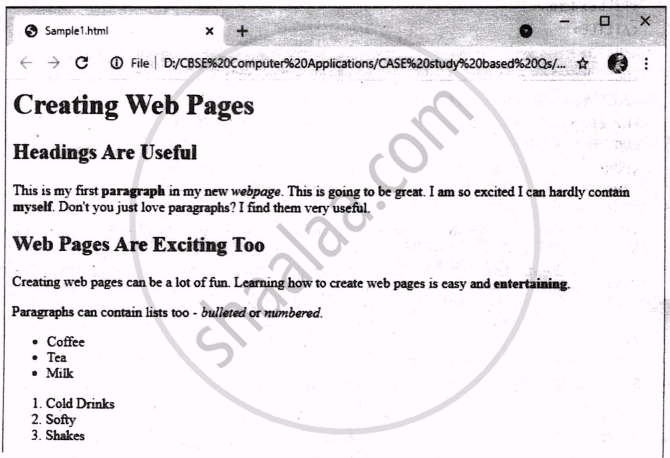
Consider the code written to create the above web page and answer the questions given below:
<html>
______                  --- line 1
<h1>Creating Web Pages</h1>
<h2>Headings Are Useful</h2>
<p>This is my first <strong>paragraph<______> in my new <em>webpage</em>.     --- line 2
This is going to be great. I am so excited I can hardly contain <b>myself</b>.
Don't you just love paragraphs? I find them very useful. </p>
<h2>Web Pages Are Exciting Too</h2>
<p>Creating web pages can be a lot of fun. Learning how to create web pages is easy and
______ entertaining______</p>                --- line 3
<p> Paragraphs can contain lists too - <em>bulleted</em> or <em>numbered</em>. </p>
______                                      --- line 4 a
     <li>Coffee</li>
     <li>Tea</li>
     <li>Milk</li>
     ______                                 --- line 4 b
     ______                                 --- line 5 a
     <li>Cold Drinks</li>
     <li>Softy</li>
     <li>Shakes</li>
     ______                                 --- line 5 b
</Body>
</HTML>- Choose the correct option to fill up line 1.
- <page body>
- <body>
- body page
- body
- Choose the correct option to fill up line 2.
- Strong
- \strong
- /strong
- /strong/
- Choose the correct option to fill up line 3.
- B, /B
- <B>, </B>
- <\B>, <B>
- </B>, <B>
- Choose the correct option to fill up line 4 (a, b).
- OL, /OL
- <OL>, </OL>
- UL, /UL
- <UL>, </UL>
- Choose the correct option to fill up line 5 (a, b).
- OL, /OL
- <OL>, </OL>
- UL, /UL
- <UL>, </UL>
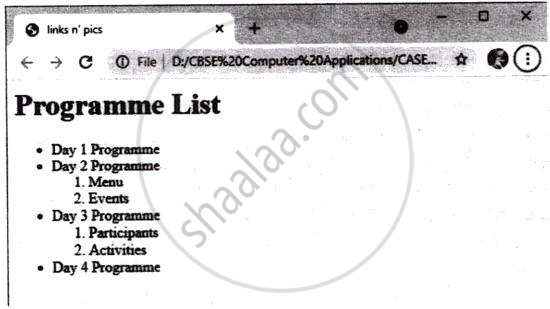
<html>
<head>
   ______ links n' pics ______        ---line 1
</head>
<body>
   ______ Programme List ______       ----line 2
   ______                             ----line 3
   <li> Day 1 Programme</li>
   <li> Day 2 Programme
   ______                             ----line 4
         <li> Menu </li>
         <li> Events </li>
     </o1>
   </li>
   <li> Day 3 Programme </li>
     ___ ____ Participants </li> <li> Activities </li> </ol>      ---line 5
   <li> Day 4 Programme </li>
   </ul>
</body></html>
Consider the code written to create the above web page and answer the questions given below:
- Choose the correct option to fill up line 1.
- <head>, </head>
- <head>, </title>
- <title>, </title>
- </title>, <title>
- Choose the correct option to fill up line 2.
- </h1>, </h1>
- <h1>, <h1>
- <h1>, </h1>
- </h1/>, </h1/>
- Choose the correct option to fill up line 3.
- <ul>
- <ol>
- </ul>
- </ol>
- Choose the correct option to fill up line 4.
- <ul>
- <ol>
- </ul>
- </ol>
- Choose the correct option to fill up line 5.
- <li> <ul>
- <li> <ol>
- <ul> <li>
- <ol> <li>
Consider the following code created by Sumantha for a webpage:
<html>
<body bgcolor = "yellow">
<center>
<h1> Our Country: India <__>                                ---line1
<imgsrc="india.jpg">
</center>
<p>
<font color="red" size="5" ______="Times New Roman">        ---line2
India is spread over a large geographical area. In terms of area,
it is the 7<sup>th</sup> largest country while in terms of population,
it is the 2<sup>nd</sup> largest country in the world.
Some facts about India are as follows<___></p>              ---line3
<ul>
<li>Area :Approx 3.28 million sq. km <_>                    ---line4
<li>North to South extension :Approx 3,200 km</li>
<li>East to West extension :Approx 2900 km</li>
<___>                                                       ---line5
</body>
</html>
Based on the given information, answer the following questions:
- Choose the correct option from the following to fill up in line 1.
- \h1
- \h6
- /h6
- /h1
- Choose the correct option from the following to fill up in line 2.
- font
- face
- type
- text
- Choose the correct option from the following to fill up in line 3.
- </f>
- <f>
- </font>
- <font>
- Choose the correct option from the following to fill up in line 4.
- <i>
- </li>
- <\li>
- <\i>
- Choose the correct option from the following to fill up in line 5.
- ul
- <\ul>
- <ul>
- </ul>
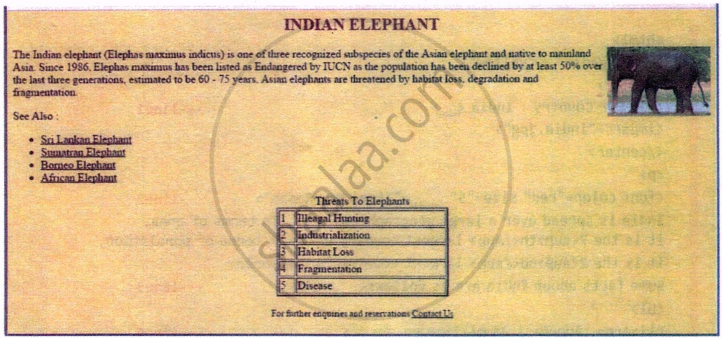
<HTML>
<HEAD>
<TITLE>
</TITLE>
</HEAD>
<BODY bgcolor = "yellow" link = "black" vlink = "green"
<______ face =" "Arial" color = "maroon">                      ---Line 1
<H2 align = "center"> INDIAN ELEPHANT </H2> </FONT>
<FONT face =" "Arial">
<IMG ______= "elephant.png" height = "100" width = " 100" align = "right">
                                                               ---Line 2
The Indian elephant (Elephas maximus indicus) is one of three recognised subspecies of
the Asian elephant and native to mainland Asia. Since 1986, Elephas maximus has been
listed as Endangered by IUCN as the population has been declined by at least 50% over
the last three generations, estimated to be 60 - 75 years. Asian elephants are
threatened by habitat loss, degradation and fragmentation.

<P>
See Also:
<UL>
   <LI> <A href = "one.html"> Sri Lankan Elephant </A> </LI>
   <LI> <A href = "two.html"> Sumatran Elephant </A> </LI>
   <LI> <A href = "three.html"> Borneo Elephant </A> </LI>
   <LI> <A href = "four.html"> African Elephant </A> </LI>
</UL>
<TABLE align = "center" border = "2" width = "250">
  ______ Threats To Elephants ______                               --- Line 3
  ______ <TD> 1 </TD>      <TD> Illegal Hunting </TD>______        --- Line 4
  <TR>
  <TD> 2 </TD>
  <TD> Industrialisation </TD>
  </TR>
  <TR>
  <TD> 3 </TD>
  <TD> Habitat Loss </TD>
  </TR>
  <TR>
  <TD> 4 </TD>
  <TD> Fragmentation </TD>
  </TR>
  <TR>
  <TD> 5 </TD>
  <TD> Disease </TD>
  </TR>
</TABLE>
<P> <P>
<FONT size = "2"> <CENTER> For further enquiries and reservations <______ "[email protected]">
Contact Us </A> </CENTER>            ----line 5
</BOdy>
</HTML>
Consider the code written to create the above web page and answer the questions given below:
- Choose the correct option to fill up line 1.
- FONT
- ?FONT
- /FONT
- \FONT
- Choose the correct option to fill up line 2.
- Source
- Image
- src
- File
- Choose the correct option to fill up line 3.
- <HEAD> </HEAD>
- <TITLE> </TITLE>
- <CAPTION> </CAPTION>
- <Table Title> </Table Title>
- Choose the correct option to fill up line 4.
- </TR> <TR>
- <TR> </TR>
- <?TR> <TR?>
- <=TR> </TR>
- Choose the correct option to fill up line 5.
- href =
- href A =
- A href =
- A =
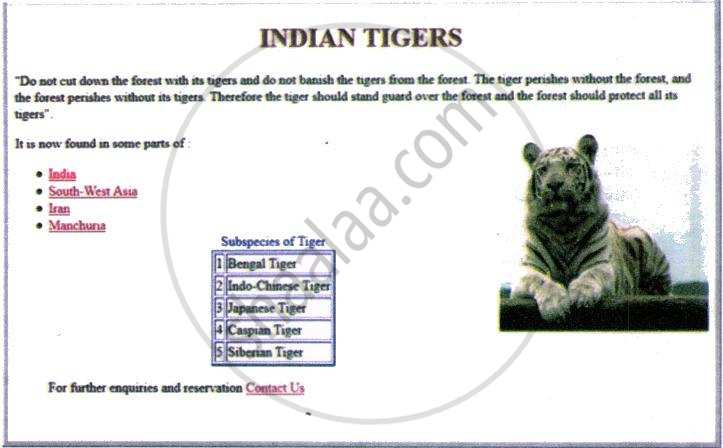
  <html>
  <head>
  <title>Wildlife in India</title>
  </head>

  <body link=brown alink=yellow vlink=red>
  <font color=maroon>
  <______ > INDIAN TIGERS</h1>           ---line 1
  </font>
  <p>
"Do not cut down the forest with its tigers and do not banish the tigers from the
forest. The tiger perishes without the forest, and the forest perishes without its
tigers. Therefore the tiger should stand guard over the forest and the forest should pro-
tect all its tigers".
  <p>
  <______ ="tiger1.jpg" align=right>     ---line 2

  It is now found in some parts of:
  <UL>
  <LI> ______ India</A>              ---line 3a ( Link to "one.html" )
  <LI> ______ South-West Asia</A>    ---line 3d ( Link to "two.html" )
  <LI> ______ Iran</A>               ---line 3c ( Link to "three.html" )
  <LI> ______ Manchuria</A>          ---line 3d ( Link to "four.html" )

  <______>         ---line 4 ( table tag with border size, color and alignment)
  <caption align=centre>
  <font color=blue>Subspecies of Tiger </font>
  <tr>
   <td>1</td>
   <td>Bengal Tiger</td>
  </tr>

  <tr>
   <td>2</td>
   <td>Indo-Chinese Tiger</td>
  </tr>

  <tr>
   <td>3</td>
   <td>Japanese Tiger</td>
  </tr>

  <tr>
   <td>4</td>
   <td>Caspian Tiger</td>
  </tr>

  <tr>
  <td>5</td>
   <td>Siberian Tiger</td>
  </tr>

</table>
<p align = left>
For further enquiries and reservation <A ______>Contact Us</A>
                             ---line 5 ( link to mail id [email protected])

</body>
</html>
Consider the code written to create the above web page and answer the questions given below:
- Choose the correct option to fill up line 1.
- align = center
- h1 = center
- h1 center align
- h1 align = center
- Choose the correct option to fill up line 2.
- image
- image source
- src img
- img src
- Choose the correct option to fill up lines 3a, b, c, d
- <href ="<filename>.html">
- <A href="<filename>.html">
- <A="<filename>.html">
- <link="<filename>.html">
- Choose the correct option to fill up line 4.
- <table border = 2, blue, center>
- <table bordercolor = blue align = center>
- <table border size, color, align = 2, blue, center>
- <table border = 2 bordercolor = blue align = center>
- Choose the correct option to fill up line 5.
- mailto:[email protected]
- mailto = [email protected]
- href = mailto:[email protected]
- A= mailto:[email protected]
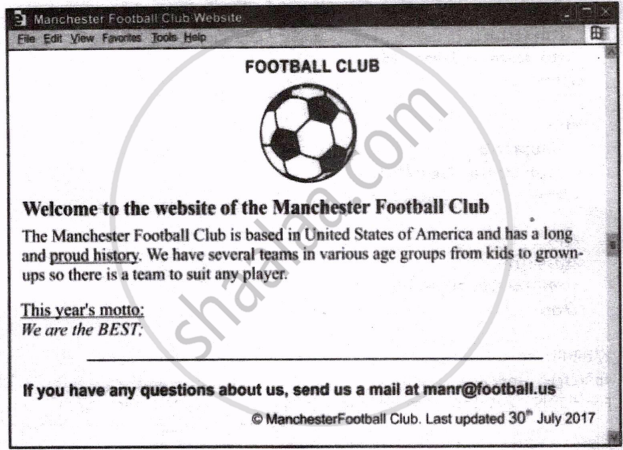
<HTML>
<BODY>
<HEAD>
<TITLE>FOOTBALL CLUB</TITLE>
</HEAD>
<BODY>
<FONT FACE="Arial">
<P ALIGN="Center">
<H1><FONT COLOR= "Blue" >FOOTBALL CLUB</H1></FONT>
<BR>
______       ---- line 1 (tag to insert image "football.png" here)
</CENTER>

<B>
Welcome to the website of the Manchester Football Club
</B>
<BR>
The Manchester Football Club is based in United States of America and has a long and
<A HREF="history.html">proud history</A>.
We have several teams in various age groups from kids to
grownups so there is a team to suit any player
<BR><BR>
<U> ______ This year's motto: </A></U>      ---line 2 (link to "moto.html)
<BR>
<I>We are the BEST: </I>
<HR>
<B>If you have any questions about us, send us a mail at [email protected]</B>
<BR>
<FONT SIZE=2>
<P ALIGN="Right">© Manchester Football Club Last updated
30<SUP>th</SUP> July 2017
</P>
______        --- line 3 (begin table here)
______        --- line 4 (Table's header rows)
<TR>... </TR>
:
______        --- line 5 (Table's footer rows)
</TABLE>
</FONT>
</FONT>
</BODY>
</HTML>
Consider the code written to create the above web page and answer the questions given below:
- Choose the correct option to fill up line 1.
- <IMaGE="football.jpeg">
- < SRC="football.jpeg" >
- <IMG ="football.jpeg">
- <IMG SRC="football.jpeg">
- Choose the correct option to fill up line 2.
- <A = "moto.html">
- <href = "moto.html">
- <linkto= "moto.html">
- <A href = "moto.html">
- Choose the correct option to fill up line 3.
- <Start Table>
- <BEGIN TABLE>
- <TABLE>
- <THEAD>
- Choose the correct option to fill up line 4.
- < Table Header>
- <HEADER>
- <Heading rows>
- <THEAD>
- Choose the correct option to fill up line 5.
- < Table Footer>
- <FOOTER>
- <Footer rows>
- <TFOOT>
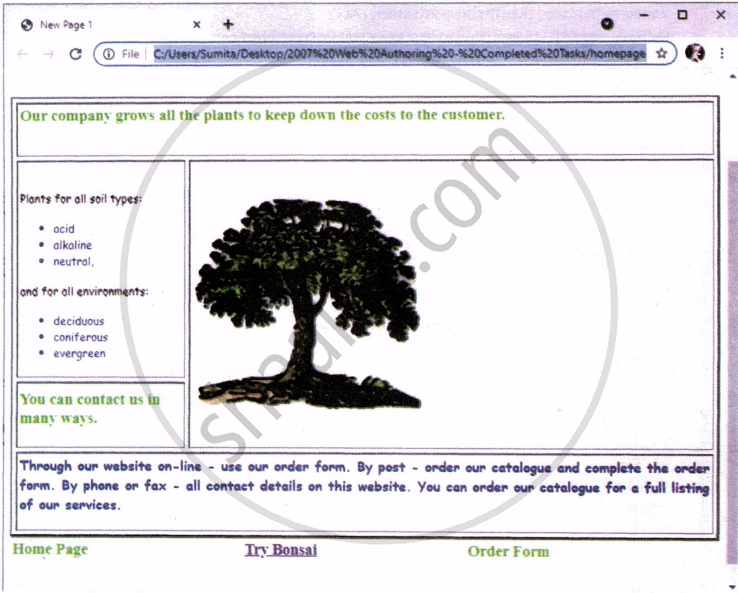
<html>
<head> <title>New Page 1</title> </head>
<body>
<p><font size="2">Last edited by: Mark Nicholls, 123456, 654321</font></p>
<h1>Rootrainer Trees</h1>
______ ---line 1 (table border 2, cellpadding 3, cellspacing 5 &tablewidth 100%)
<tr>
______ ---line 2 (Table cell having a span of 2 columns)
<h2>Our company grows all the plants to keep down the costs to the
customer.</h2>
<p> </td>
</tr>
<tr>
<td width="24%">
<p>Plants for all soil types:</p>
<ul>
<li>acid</li>
<li>alkaline</li>
<li>neutral,</li>
</ul>
<p>and for all environments:</p>
<ul>
<li>deciduous</li>
<li>coniferous</li>
<li>evergreen</li>
</ul>
</td>
<td rowspan="2" width="75%">
______ -------line 3 ( Import the image SPECIMEN4.GIF and place it in cell D.
Set the height to 250 pixels and maintain the aspect ratio.
Make sure that the whole image is visible. )
</td>
</tr>
<tr>
<td width="24%" height="77"><h2>You can contact us in many ways.</h2>
</td>
</tr>
<tr>
<td colspan="2">
<h3>Through our website on-line - use our order form. By post - order
our catalogue and complete the order form. By phone or fax - all contact
details on this website. You can order our catalogue for a full listing
of our services.</h3>
</td>
</tr>
</table>
<table border="0" width="100%">
<tr>
______ ---line 5а
<h2>Home Page</h2>
______ ---line 5b
______ ---line 5c
________ ---line 4
( Create a hyperlink for the menu item Try Bonsai to point to
the file SPECIMEN2.HTM )
______ ---line 5d
______ ---line 5e
<h2>0rder Form</h2>
______ ---line 5f
</tr>
</table>
</body>
</html>Consider the code written to create the above web page and answer the questions given below:
- Choose the correct option to fill up line 1.
-
< border="2" width="100" cellspacing="5" cellpadding="3"> -
<table border="2" width="100%" cellspacing="5" cellpadding="3"> -
< border="2" width="100%" cellspacing="5" cellpadding="3"> -
<table border="2%" width="100%" cellspacing="5%" cellpadding="3%">
-
- Choose the correct option to fill up line 2.
-
<cell colspan="2"> -
<table colspan="2"> -
<td colspan="2"> -
<colspan="2">
-
- Choose the correct option to fill up line 3.
-
<pre> <image src="SPECIMEN4.gif" pre> -
<pre> <img border="0" src="SPECIMEN4.gif" height="250"></pre> -
<pre> <image src="SPECIMEN4.gif" ></pre> -
<pre> <img source="SPECIMEN4.gif" size="250"></pre>
-
- Choose the correct option to fill up line 4.
-
<a href="Specimen2.htm">Try Bonsai</a> -
<h2 a href="Specimen2.htm">Try Bonsai</h2> -
<a> <h2>href="Specimen2.htm">Try Bonsai </h2></a> -
<h2><a href="Specimen2.htm">Try Bonsai</a> </h2>
-
- Choose the correct option to fill up line 5 (a, b, c, d, e f). How many sets of <TD> and </TD> are used to depict the last row of table having "Try Bonsai" as the middle cell?
- 1
- 2
- 3
- 4
Solutions for *: Case Study Based Questions Unit II: HTML
Sumita Arora solutions for कम्प्युटर अँप्लिकेशन [इंग्रजी] इयत्ता १० chapter * - Case Study Based Questions Unit II: HTML
Shaalaa.com has the CBSE Mathematics कम्प्युटर अँप्लिकेशन [इंग्रजी] इयत्ता १० CBSE solutions in a manner that help students grasp basic concepts better and faster. The detailed, step-by-step solutions will help you understand the concepts better and clarify any confusion. Sumita Arora solutions for Mathematics कम्प्युटर अँप्लिकेशन [इंग्रजी] इयत्ता १० CBSE * (Case Study Based Questions Unit II: HTML) include all questions with answers and detailed explanations. This will clear students' doubts about questions and improve their application skills while preparing for board exams.
Further, we at Shaalaa.com provide such solutions so students can prepare for written exams. Sumita Arora textbook solutions can be a core help for self-study and provide excellent self-help guidance for students.
Concepts covered in कम्प्युटर अँप्लिकेशन [इंग्रजी] इयत्ता १० chapter * Case Study Based Questions Unit II: HTML are Introduction to HyperText Markup Language (HTML), HTML Structure, Getting Started With HTML Programming, Basics of HTML Tags, Style Tags, Lists in HTML, Images in HTML, Links in HTML, Superscript and Subscript in HTML, Tables in HTML, Forms in HTML, Cascading Style Sheets in HTML, Embed Audio and Video in HTML Page, Different Controls Supported by HTML Form.
Using Sumita Arora कम्प्युटर अँप्लिकेशन [इंग्रजी] इयत्ता १० solutions Case Study Based Questions Unit II: HTML exercise by students is an easy way to prepare for the exams, as they involve solutions arranged chapter-wise and also page-wise. The questions involved in Sumita Arora Solutions are essential questions that can be asked in the final exam. Maximum CBSE कम्प्युटर अँप्लिकेशन [इंग्रजी] इयत्ता १० students prefer Sumita Arora Textbook Solutions to score more in exams.
Get the free view of Chapter *, Case Study Based Questions Unit II: HTML कम्प्युटर अँप्लिकेशन [इंग्रजी] इयत्ता १० additional questions for Mathematics कम्प्युटर अँप्लिकेशन [इंग्रजी] इयत्ता १० CBSE, and you can use Shaalaa.com to keep it handy for your exam preparation.
