Advertisements
Advertisements
प्रश्न
How do you save a file as HTML file?
संक्षेप में उत्तर
Advertisements
उत्तर
- Click File → Save (or) Press Ctrl + S.
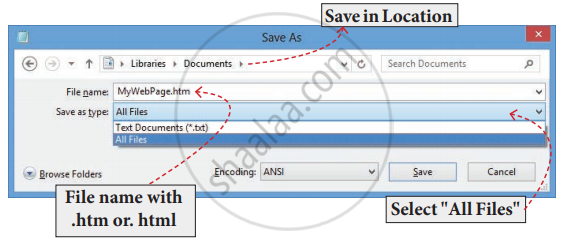
- Save as dialog box appears as shown in the following diagram.
- In “File Name” text box, type a file name with .htm or .html extension.
- Select “All Files” from “Save as type” list box.
- Click. “Save” button.
shaalaa.com
क्या इस प्रश्न या उत्तर में कोई त्रुटि है?
