Advertisements
Advertisements
प्रश्न
Create a text document on a topic of your choice. Choose A4 as page size and 'portrait' as page orientation. Now change the page orientation to 'landscape' and observe the change in the document.
Advertisements
उत्तर
The title bar of the new document contains the name of the document and the name of the application (OpenOffice Writer). It had not given any name to his document, ‘Untitled 1’ is displayed on the title bar.

First fix the setting of the document. so that the page size, orientation, margins, and background colour can be fixed.
If you want your document vertically elongated, select ‘Portrait’ orientation, if you want it to be horizontally elongated, select ‘Landscape’ orientation.
I will select page size as A4, orientation as Portrait, and 0.79-inch margin on all four sides of the page.

Sometimes the page orientation for a particular page has to be different from the rest of the material. Select pages or paragraphs on pages that you want to switch to Portrait or Landscape orientation. In the Page Setup dialog box, on the Margins tab, choose Portrait or Landscape orientation.
To change the orientation of the whole document, first select Layout, and next Orientation. Choose Portrait or Landscape. Select Landscape, and in the Apply to box, choose selected text."
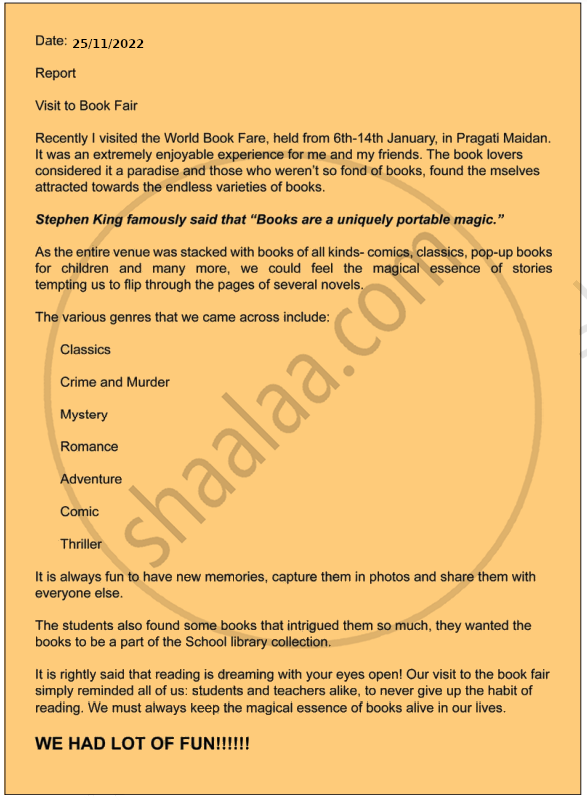
I started typing the text. After typing, his report looked.
APPEARS IN
संबंधित प्रश्न
Place option is present in ________ menu.
________ bar is the topmost part of the PageMaker window.
Choose the odd man out.
Choose the odd man out.
You got a chance to view a cricket match in the stadium. Create a document to share your experiences with your friends.
Choose the odd man out.
Choose the odd man out.
Choose the odd man out.
Choose the odd man out.
Choose the odd man out.
Choose the odd man out.
Choose the odd man out.
Choose the odd man out.
Choose the odd man out.
