Topics
Number Systems and Binary Arithmetic
Program Analysis
Introduction to C+ +
- Introduction to C++
- Character Sets
- Standard I/O Strems in C++
- Type Modifiers
- C++ Data Types
- Variables in C++
- Constants
- Compiler Tokens
- Operators in C++
- Comments in C++
- Scope and Visibility
- Control Statements
- Functions in C++
- Default Arguments
- Techniques used to pass Variables into C++ Functions
- Function Overloading
- Inline Functions
- Recursion
- Pointers in C++
- Arrays in Data Structure
- References
- Type Conversion in Expressions
Visual Basic
Introduction to Networking and Internet
- Introduction to Networking Technology
- Networking Terms and Concepts
- Concept of Computer Network
- Network Security
- Network Applications
- Algorithm
- Flow Charts
- Pseudocode
Algorithm
An algorithm is a logical sequence of steps prepared for solving problems. Algorithm is a tool to write the steps in simple English language It helps a programmer to prepare a program. Algorithm is not programming language or program
Characteristics of the Algorithm :
- It should be easy and simple in language and should not repeat the task again and again
- The number of steps in algorithm should not be much more it must ne accurate and complete in itself
- The code can be modified easily if necessary one step should not alter the other structure or step
- The logic should be capable of handling the worst condition and should be understandable to others and steps should be clear and concise
- It should be economical in the use of computer time, computer storage and peripherals
- When user input the data, there should ba a provision to accept the input data and produce corresponding output
For example:
1) Factorial Computation
Give a number n, compute n factorial, when n ≥ 1
Algorithm :
The factorial of 'n' is given by
n! = 1 x 2 x 3 ........ x n for n ≥ 1
i.e., n! = n x (n-1)!
Here we will start with initial value of product = 1 and then go on multiplying product by 1, 2, 3, ..., until 'n' appears
This can be achieved by following the procedure:
1. Read in 'n'.
2. Set product to 1 and count to one
3. While count is less than or equal to 'n,' repeatedly do:
a) Compute new product by multiplying count by the product
b) Increase count by one
4. Result is recent product
5. Stop
Flowchart
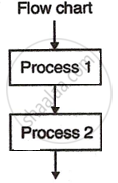
A flowchart is the graphical representation of an algorithm After preparing an algorithm for a given task, it can be presented in a pictorial form in brief. The method used to represent an algorithm in pictorial form with standard meaningful symbols is known as a flowchart
With flowcharts, the programmers can illustrate the different loops , logical decisions , input and output data, etc. To draw a flowchart, the following figures are used as standard convention:
| SYMBOL | MEANING |
 |
Start/End : Oval shape. Shows where the process begins or ends. |
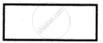 |
Process : Rectangle. Represents a task or action to be done. |
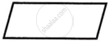 |
Input or output : parallelogram. Shows data coming in or going out (input/output). |
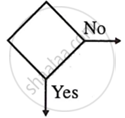 |
Decision : Diamond. Used for yes/no or true/false questions |
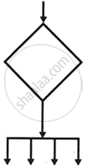 |
More Alternate Paths : Diamond with multiple arrows. Represents more than two options. |
 |
Connector : Circle. Connects different parts of the chart, often across pages. |
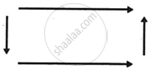 |
Flow lines : arrows. Show the direction of the flow in the process |
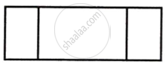 |
Function symbol : divided rectangle. Represents a predefined process or function |
Advantages of using flowcharts:
1. Flowcharts are not related to any programming language. Hence, they can be implemented in any programming language
2. Flowcharts are easy to understand. The data flow of the program can be easily understood by a flowchart, and errors in it can be easily recovered.
3. When we need to incorporate some more facilities within the program, then it is easy to incorporate them through a flowchart.
For example:
1) Develop a flowchart for the generation of n Fibonacci numbers: 0, 1, 1, 2, 3, 5, 8,...
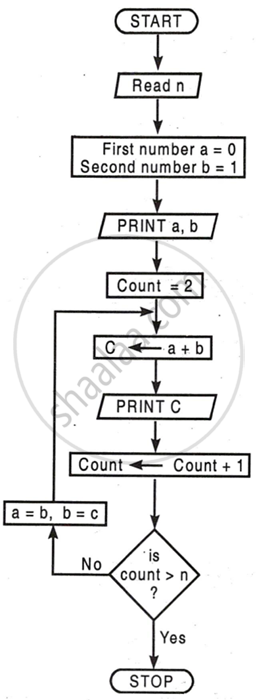
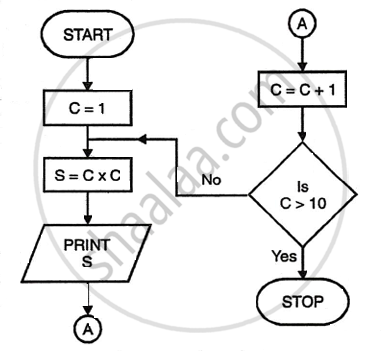
2) Flowchart to find squares of numbers from 1 to 10.
Pseudocode
Pseudo means false, and code refers to the instructions written in programming language. It is an imitation of actual computer instructions Pseudocode is written in plain, human-readable language, not in a specific programming language. Pseudo-code is an intermediate step between an algorithm and program code.

Advantages of pseudocode
1) Converting a pseudocode to a programming language is much easier compared to a flowchart.
2) It's easy to write pseudocode as compared to drawing flowcharts and actual language programs because pseudocode has few rules to follow. So it will concentrate on the logic of the program.
Limitations of pseudocode
1) Graphic representation of program logic is not available in pseudocode.
2) As there are no standard rules for writing pseudocode, different programmers may use their own style, which may cause communication problems.
