Advertisements
Advertisements
Observe the following figure. Identify the statement for writing 'RESULT'.

Concept: undefined >> undefined
Which of the following command will not display the maximum column Rainfall?
Concept: undefined >> undefined
Advertisements
Observe the following figure. Identify the statement for printing 'marks' in figure.
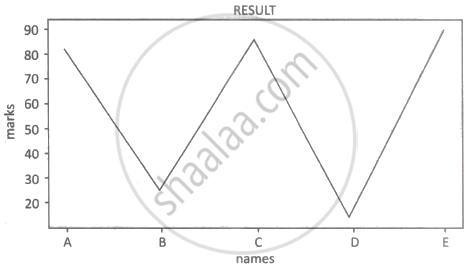
Concept: undefined >> undefined
Size and values of data of Series are ______.
Concept: undefined >> undefined
Observe the following figure. Identify the coding for obtaining this as output.

Concept: undefined >> undefined
Select code to display the sum of Series M1 and Series M2:
(i) print (sum(M1,M2))
(ii) print(M1+M2)
(iii) print(M1.add(M2))
(iv) print(M1.sum(M2))
Concept: undefined >> undefined
The command used to give a heading to a graph is ______.
Concept: undefined >> undefined
A Computer Virus is a ______
Concept: undefined >> undefined
Select code to show rows where values of series M1 greater than 75.
Concept: undefined >> undefined
Choose the right code.
Concept: undefined >> undefined
What is the minimum number of arguments required for savefig() function in matplotlib?
Concept: undefined >> undefined
What is the minimum number of arguments required for hist() function in matplotlib?
Concept: undefined >> undefined
Set the series name “Marks1” of M1 series:
Concept: undefined >> undefined
The keys of the dictionary are used to represent the ______ of the Series.
Concept: undefined >> undefined
Give the output.
import pandas as pd
s=pd.Series([1,2,3,4,5])
s.drop(2)
print(s.size)Concept: undefined >> undefined
Series to print scalar value “100” 5 times:
Concept: undefined >> undefined
Digital footprints are not created ______.
Concept: undefined >> undefined
Assuming the given series, named stud, which command will be used to print 5 as output?
| 1 | 5 |
| 2 | 10 |
| 3 | 15 |
| 4 | 20 |
| 5 | 25 |
Concept: undefined >> undefined
Which attribute is used to return the data type of the underlying data for the given Series object?
Concept: undefined >> undefined
Which code is correct to show rows those empno are greater than 103?
empno=[101,102,103,104,105,106,107]
p=pd.Series(empno)
Concept: undefined >> undefined
